

The strategy builder in NxtOption allows traders to create and modify multi-leg option strategies quickly. Whether you are new to the platform or looking for a complete NxtOption guide, understanding these built-in controls is essential for efficient options strategy planning in India. When building spreads or combinations, adjusting strike positions manually can be time consuming. To simplify this process, the strategy builder includes three controls: Shift, Width, and Hedge. These tools allow traders to modify strategies without editing each leg individually.
The following examples demonstrate how each feature works using the strategy builder interface.
Understanding the NxtOption Shift Control
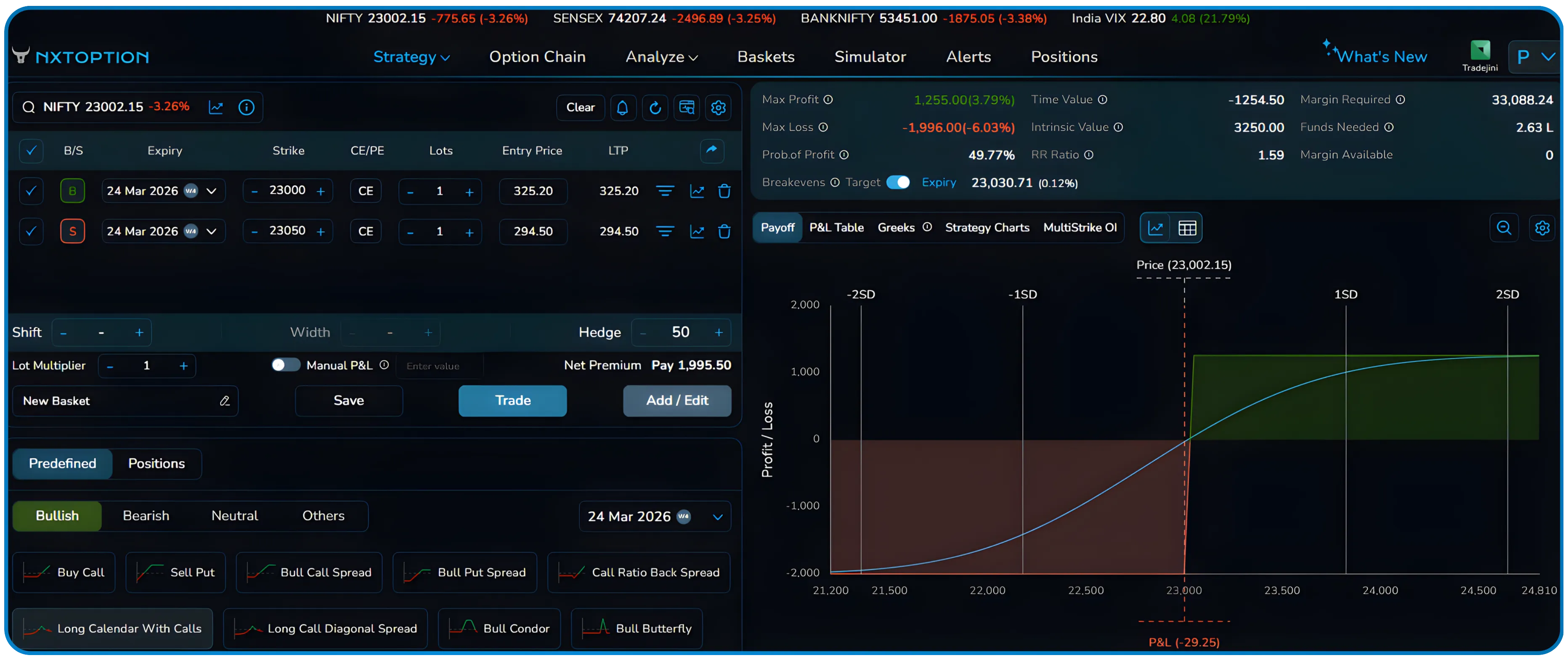
In the image below, the strategy builder shows a simple bullish structure with two call options.
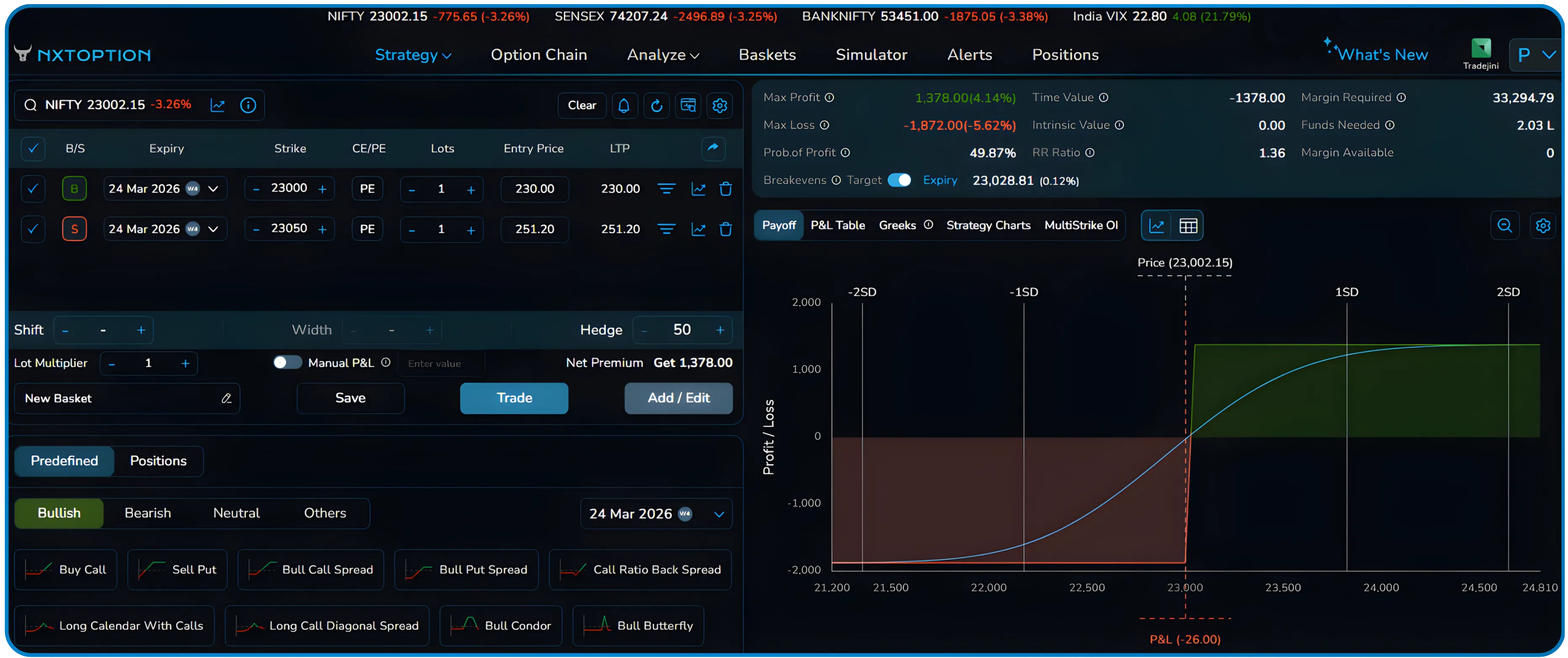
The position consists of buying the 23000 Call and selling the 23050 Call for the same expiry. This is a standard bull call spread, and the NxtOption strategy builder makes it easy to load and test such structures across Nifty options without manual entry. The payoff chart on the right reflects the combined payoff of these two positions.
When traders want to test the same structure at different strike levels, manually changing each strike can be inefficient. This is where the NxtOption Shift control becomes useful, allowing instant options strike adjustment without rebuilding the position.
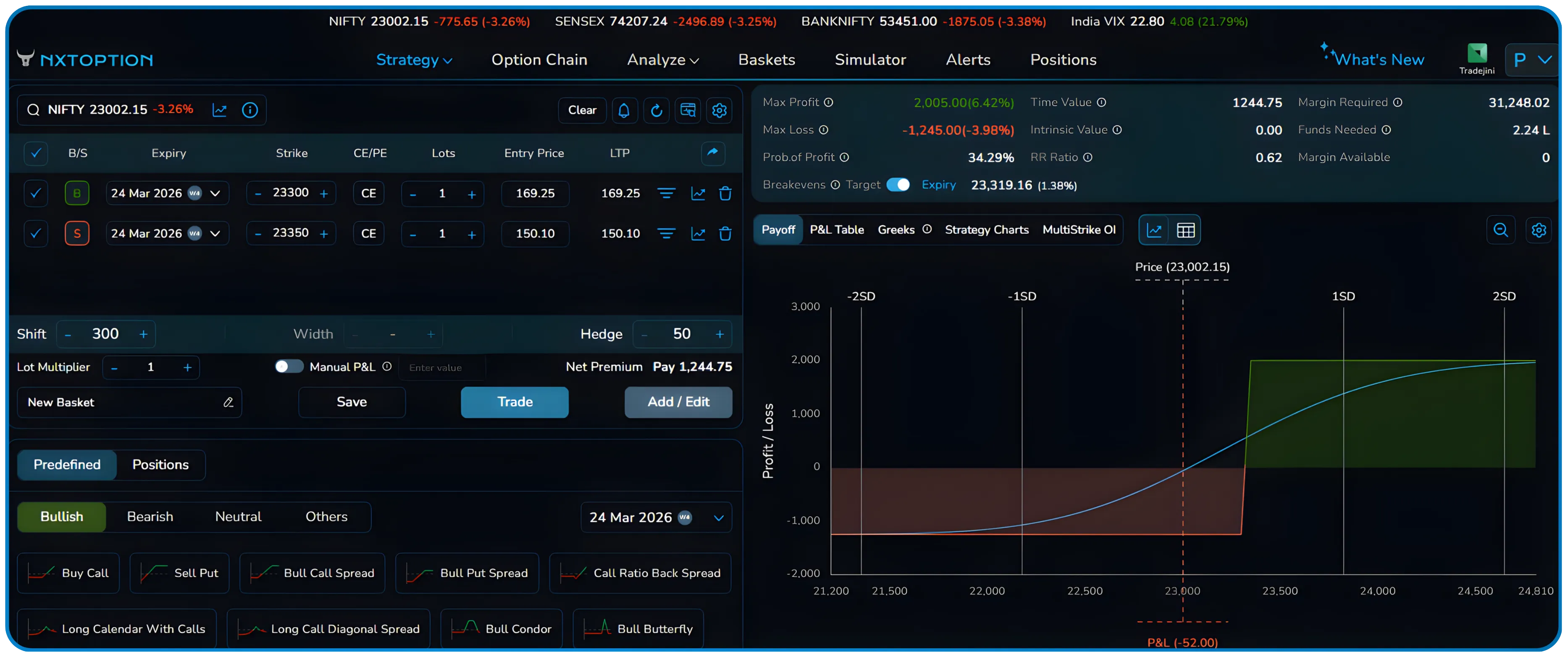
In the image above, the Shift value is set to 300. Instead of editing both strikes individually, the platform moves the entire structure higher on the option chain. The strikes automatically change to the 23300 Call and the 23350 Call.
The important point is that the relationship between the two strikes remains the same. The distance between them does not change. Only the overall position moves higher relative to the current market price.
This allows traders to quickly test how the same structure behaves across different options strike zones, supporting faster options strategy analysis. If the market moves during analysis, the strategy can be repositioned instantly, making options strategy repositioning seamless and efficient.
Understanding the NxtOption Width Control
The example below demonstrates the Width feature using a short strangle. The NxtOption options spread builder makes it easy to visualise how changing the spread distance affects the overall payoff.
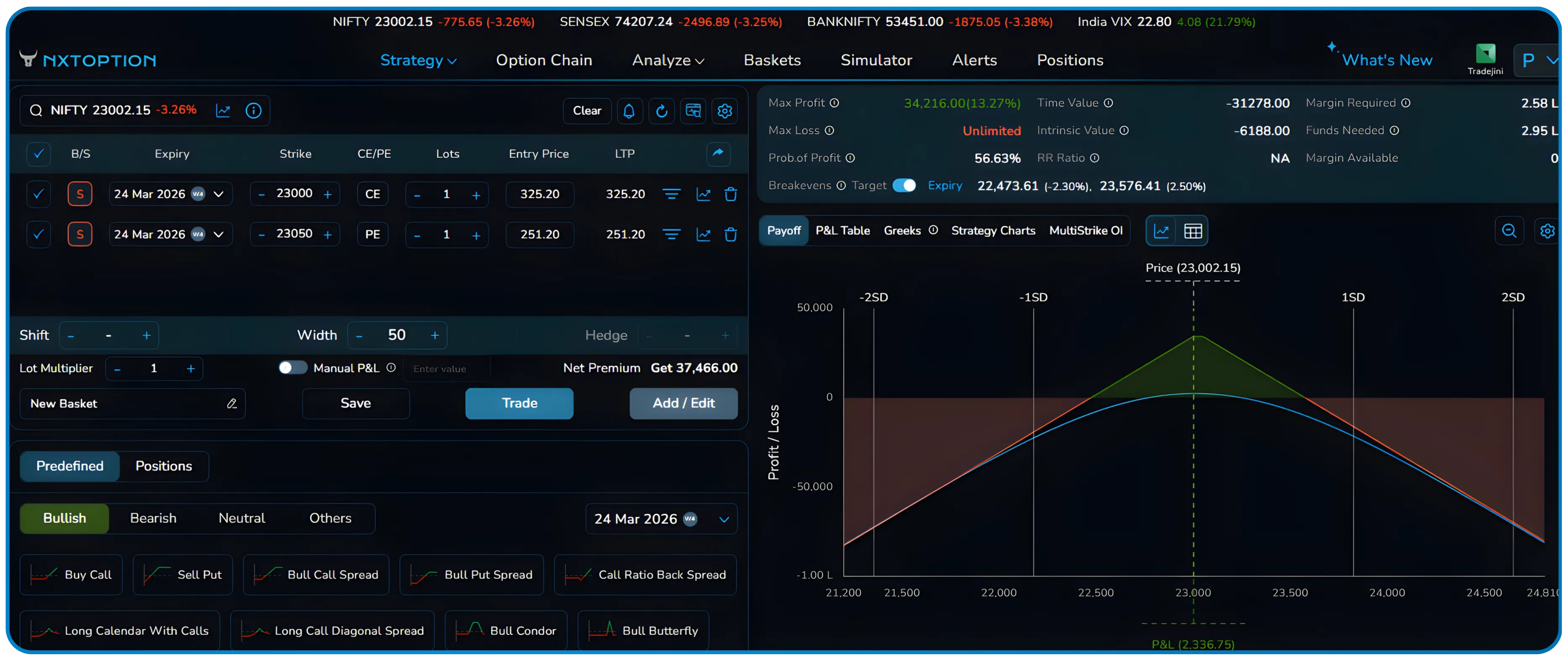
In the image above, the strategy consists of:
- Sell 23000 Call
- Sell 23050 Put
Width Control with Short Strangle Explained
This structure collects premium from both sides, and the payoff chart shows a peak profit near the current market price. The Width is set to 50, reflecting the tight gap between the two strikes.
The NxtOption Width control adjusts the options spread width while keeping the structure centered around the market, directly affecting the options strategy payoff.
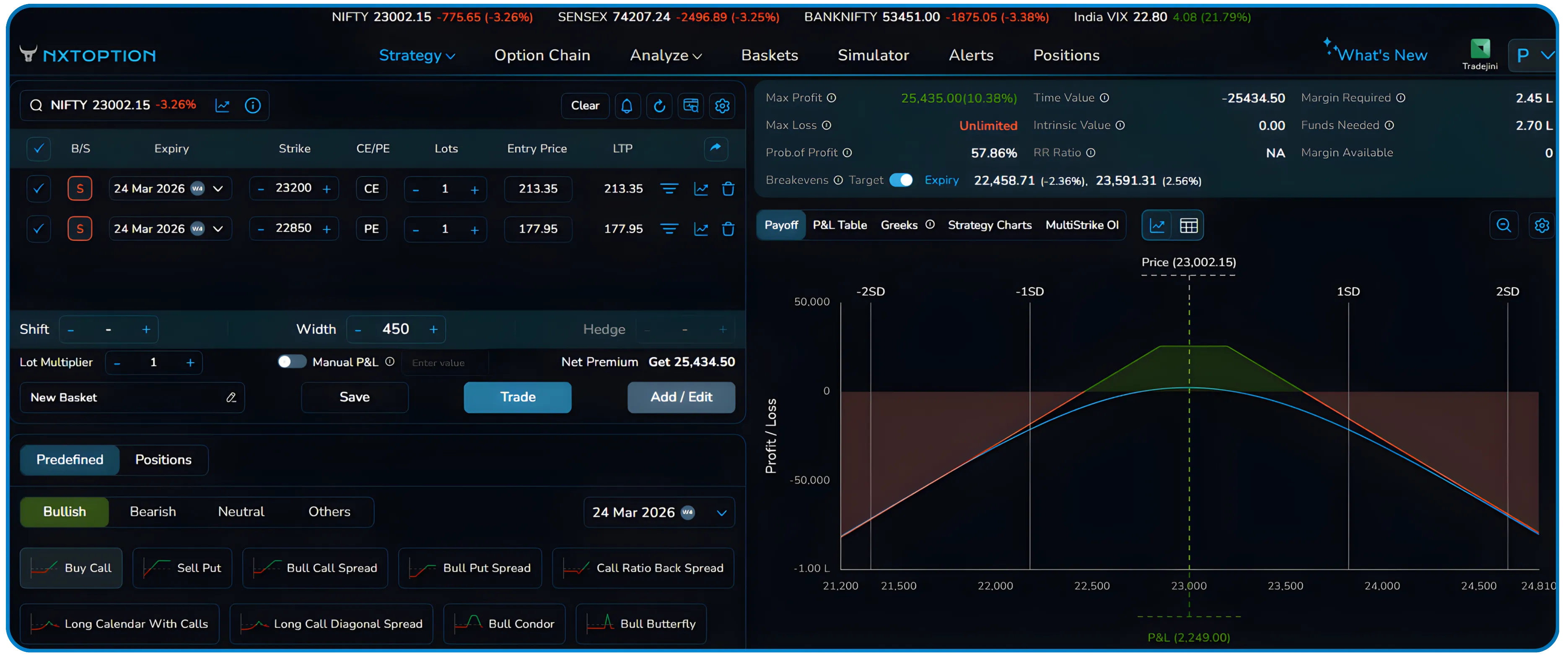
In the image above, the Width value is increased to 450. The strategy builder automatically adjusts the strikes to:
- Sell 23200 Call
- Sell 22850 Put
The distance between the call and put has expanded significantly. As a result, the payoff chart changes. The profitable zone becomes wider, but the premium collected reduces compared to a tighter structure. Increasing the options spread distance in this way is a common technique used in options strangle building to balance premium collection against breakeven range.
This feature is useful when traders want to quickly experiment with different strike distances while maintaining the same strategy type. Instead of rebuilding the strangle or manually searching for new strikes, the Width control adjusts both legs simultaneously. This kind of options leg modification in real time is what makes NxtOption particularly effective for options spread trading in India.
Also Read: Simplify Your Options Trading with Strategy Watch on NxtOption
Understanding the NxtOption Hedge Control
The image below demonstrates how the NxtOption Hedge control works, specifically in the context of a bull put spread.
The initial strategy is a bull put spread created using the following positions:
- Sell 23050 Put
- Buy 23000 Put
This structure benefits if the market stays above the higher strike. This setup is a classic example of options hedge placement, where a protective long put is added below the short put to cap the maximum downside. The net premium collected is 1,378, and the payoff chart shows limited risk and limited reward. The Hedge is set to 50, meaning the protective buy leg sits just 50 points away from the short leg.
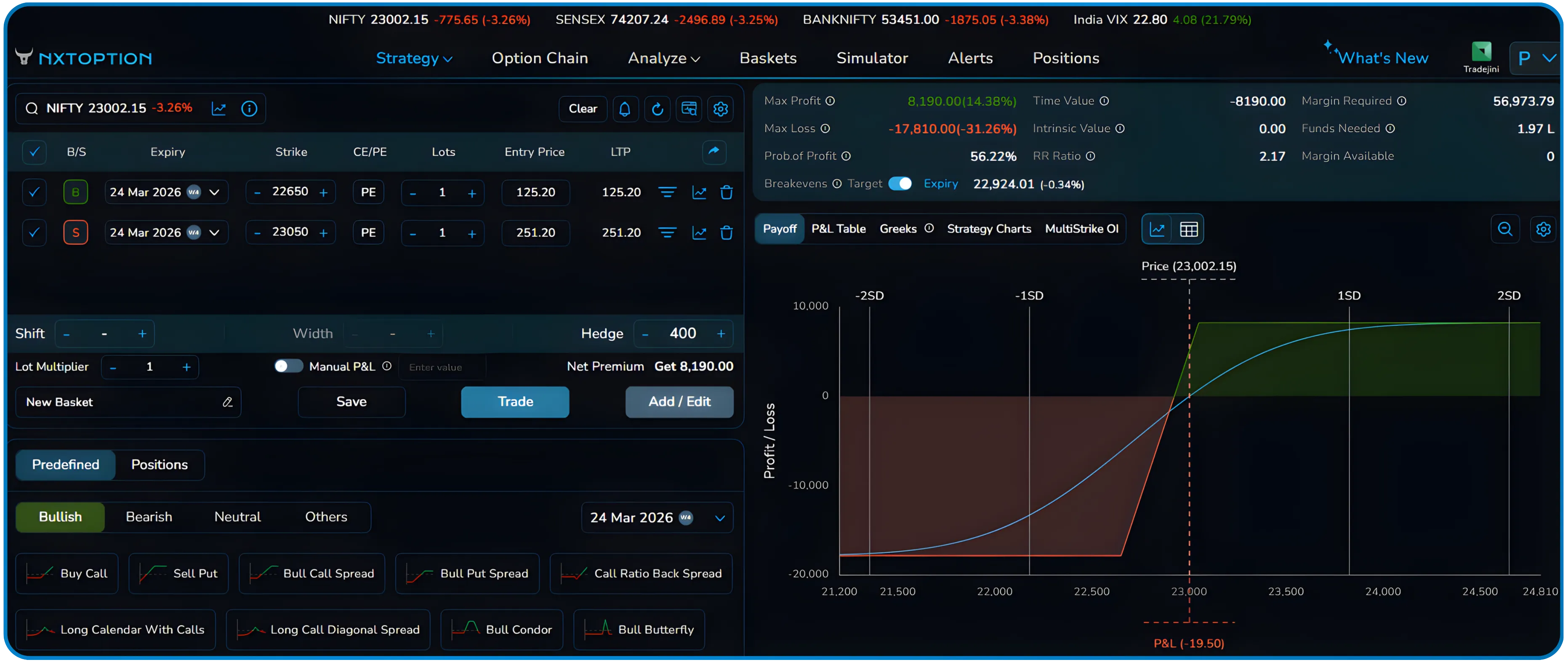
In the next image, the Hedge value is increased to 400. The strategy builder automatically moves the buy leg further away:
- Sell 23050 Put
- Buy 22650 Put
Hedging with Bull Put Spread Explained
By increasing the hedge distance, the protective leg moves further from the short option. The net premium collected increases to 8,190, but the options max loss also increases significantly as the gap between the two strikes has widened. Traders using the NxtOption short strangle or spread strategies should keep a close eye on how hedge distance affects both breakeven adjustment and margin utilisation.
A closer hedge limits risk more tightly but reduces the potential reward. A wider hedge increases the potential reward but also increases the risk exposure. The Hedge control allows traders to test these options risk reward adjustments quickly without manually recalculating strike positions, making it a valuable tool for options strategy testing before execution.
Why These Options Strategy Controls Matter
Options strategies often require repeated adjustments while analysing payoff profiles. Traders frequently test different strike locations, change spread distances, or adjust hedges before executing a trade.
The Shift, Width, and Hedge controls in the NxtOption strategy builder reduce the time required for these adjustments.Instead of editing each leg separately, traders can modify the structure directly from a single control panel, improving overall options strategy efficiency.
This makes it easier to explore multiple options strategy variations and understand how options strike positioning affects payoff, options probability of profit, and overall risk exposure — a key advantage for options multi-leg trading in India.
Disclaimer: The information provided in our blogs is for informational purposes only and should not be construed as financial, investment, or trading advice. Trading and investing in the securities market carries risk. Always conduct your own research and consult with a qualified financial advisor before making any investment decisions. Past performance is not indicative of future results. Copyrighted and original content for your trading and investing needs.
© 2026 — Tradejini. All Rights Reserved.


