

NxtOption's Group Adjust is one of those features that completely changes how you manage your options positions. Instead of manually closing one strategy and opening another, this tool lets you transform your entire position structure with just a few clicks.
Let’s see exactly how it works with a real example.
What is Group Adjust on NxtOption?
Group Adjust is NxtOption's position conversion tool that allows you to restructure your trades seamlessly. Whether you need to flip your directional bias, change expiries, adjust strike prices, or completely pivot your strategy—this feature handles it all from a single interface.
The real advantage? Everything happens in one coordinated action.
How to Use Group Adjust: Real Position Conversion Examples
Let’s look at two different scenarios where Group Adjust proves invaluable.
Example 1: NIFTY Position Conversion
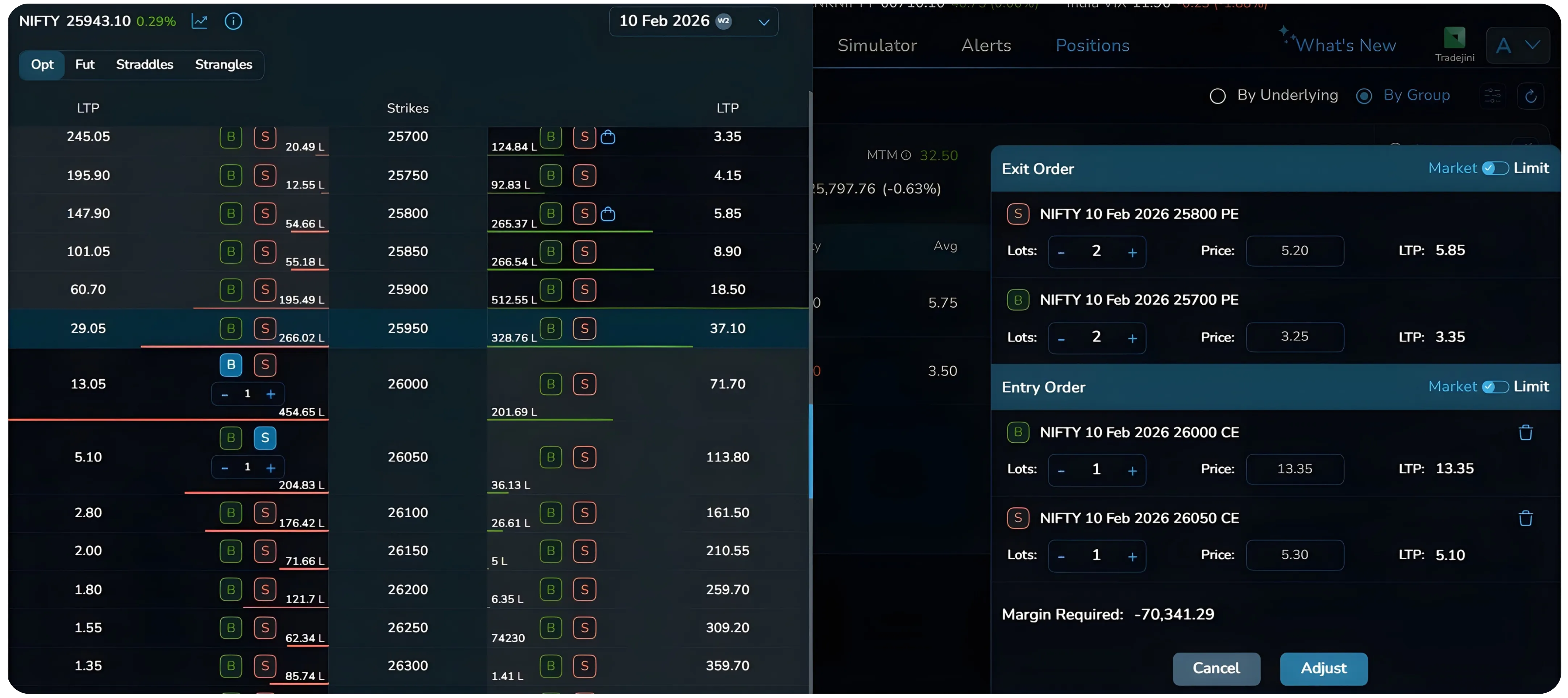
The image shows a NIFTY position for February 10, 2026 expiry that needs complete restructuring. The current position consists of short 25800 PE and long 25700 PE, both at 2 lots each. The market moved in the opposite direction, and this position is bleeding. Instead of taking the loss and walking away, Group Adjust lets you convert it entirely into a new structure; long 26000 CE and short 26050 CE at 1 lot each. Notice how the entire structure changed; from puts to calls, and even the lot size reduced from 2 to 1. This is a classic case of adjusting option strikes in real time when market direction changes.
Example 2: POWERGRID Calendar Spread Adjustment
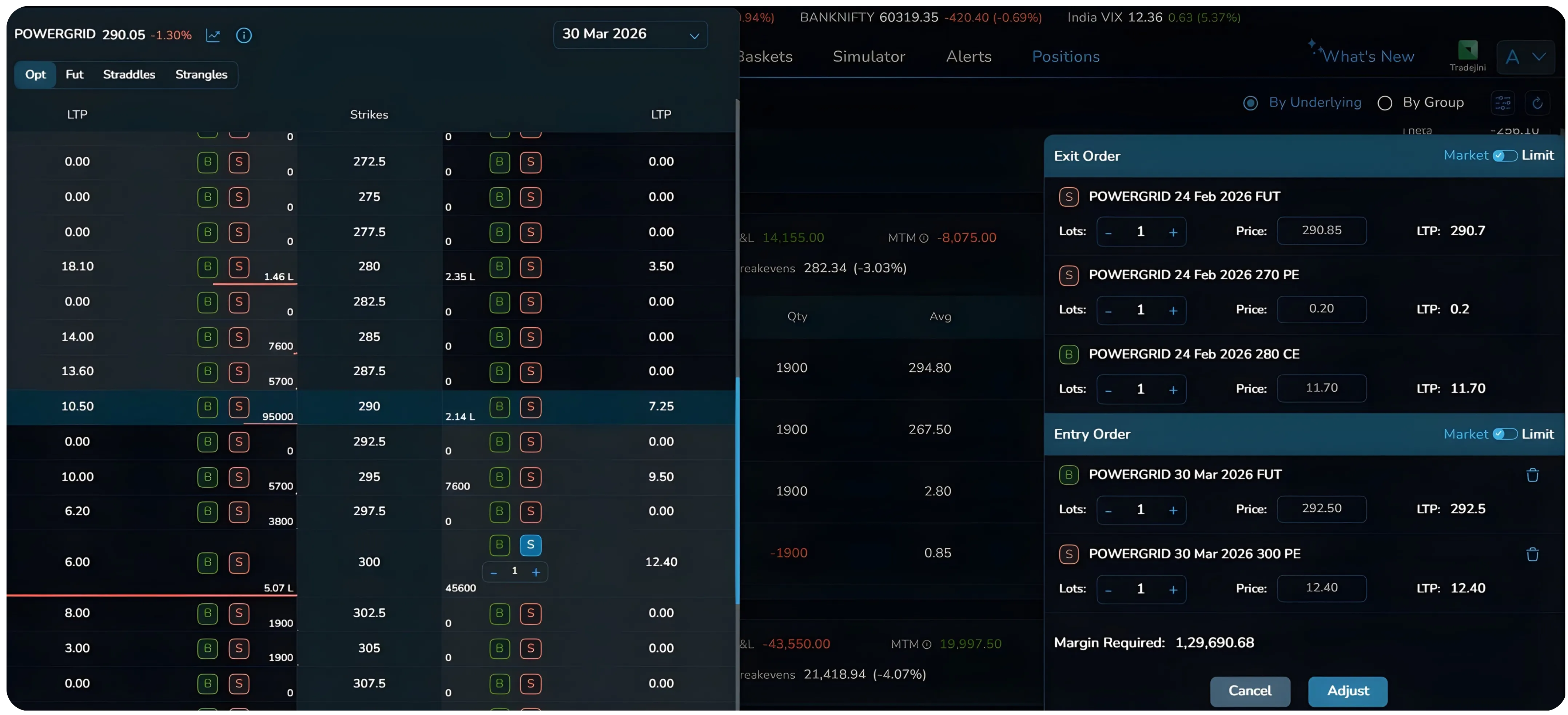
The image shows a POWERGRID calendar spread that needed restructuring. The original position had Feb 24 and Mar 30 expiry futures along with options across both months. Using Group Adjust, this entire multi-leg position was converted—exiting the Feb 24 FUT, Mar 30 FUT, Feb 24 270 PE, and Feb 24 280 CE positions, while entering new positions with different strikes and expiries.
Both examples demonstrate the same principle: Group Adjust handles complex position transformations that would otherwise require multiple manual steps. This demonstrates multi-leg options adjustment and calendar spread adjustment in a live environment.
How to Access Group Adjust on NxtOption
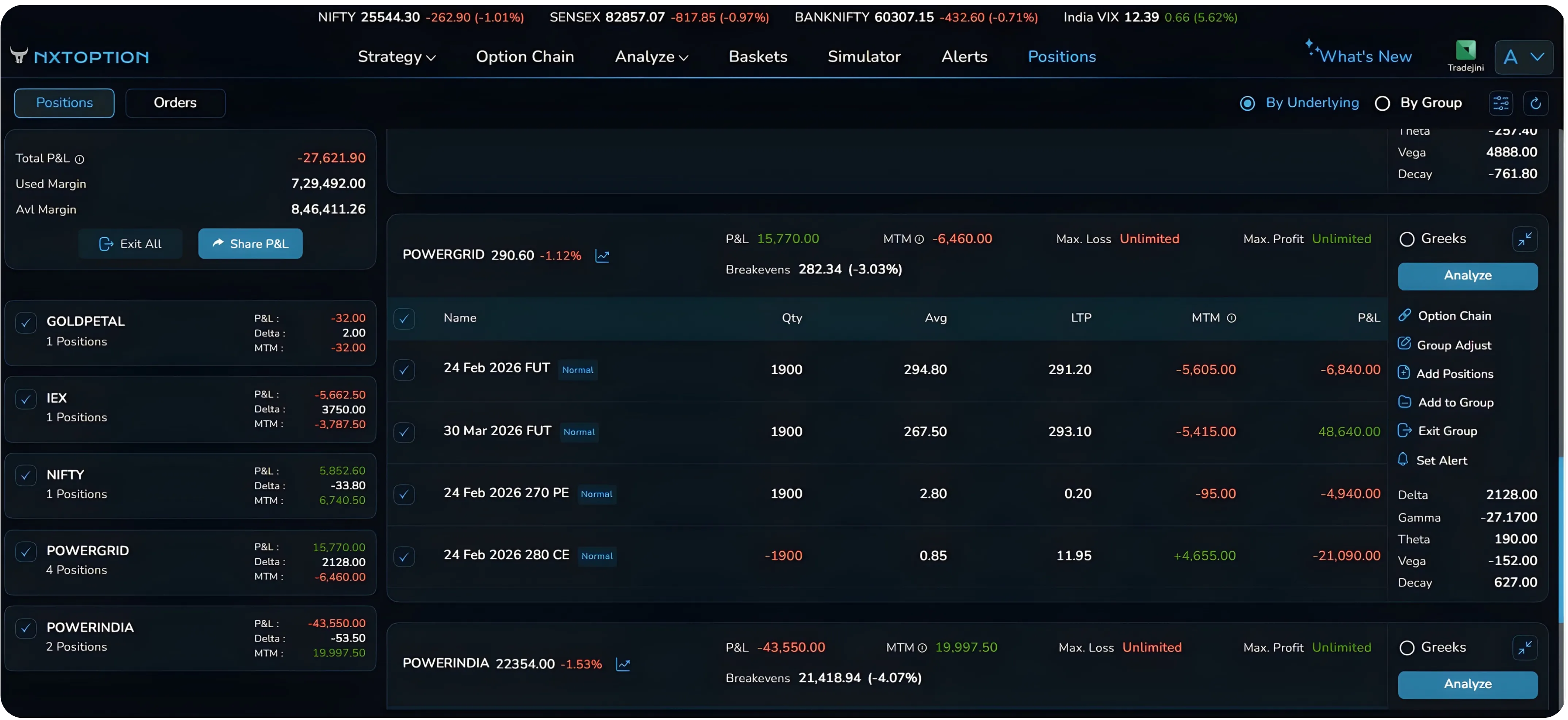
From the NxtOption dashboard, navigate to your Positions tab where you'll see all your active trades listed. Locate the position you want to adjust, and on the right side of your position details, you'll see several action options. Click on Group Adjust to open the conversion interface.
Understanding the Group Adjust Interface
Once you click Group Adjust, NxtOption opens a split-screen workspace designed specifically for position conversion. The left side displays the complete option chain for your underlying with real-time data—strike prices, LTP values, volumes, and Buy/Sell buttons for both puts and calls. This is your selection panel where you'll choose the new positions you want to enter by simply clicking on the strikes and order types you need.
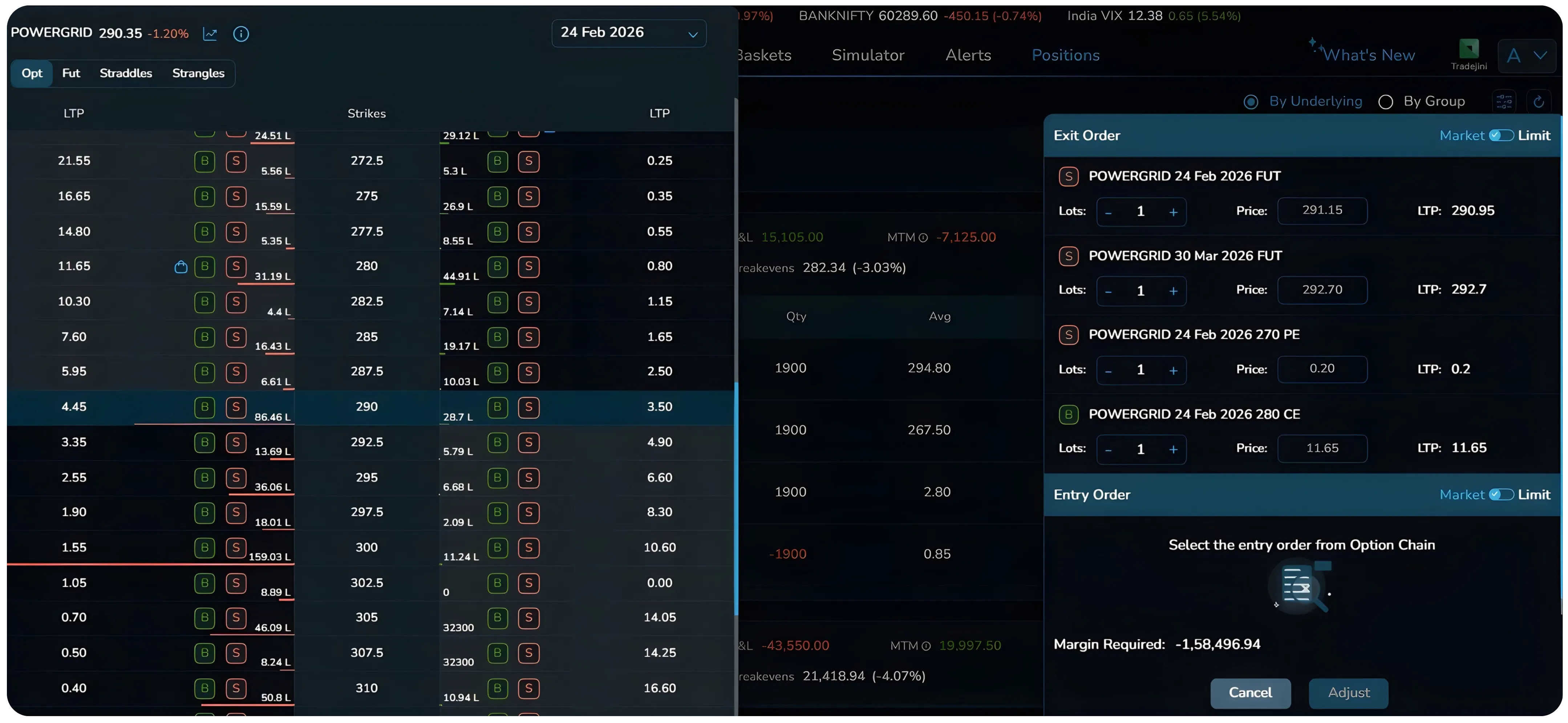
Each position can be adjusted using the plus and minus buttons for lot sizing, and you have the option to toggle between Market and Limit execution at the top right of each section.
Also read: NxtOption Alerts for Smarter Strategy-Level Monitoring to track strategy risk and react faster.
How to Build Your New Position
Building your new position is straightforward. Look at the option chain on the left side and click on the strikes you want. If you want to buy the 26000 CE, simply find that strike and click the Buy button on the call side; it immediately appears in your Entry Order section. Want to sell the 26050 CE to complete your setup? Find that strike and click Sell. Each click adds that leg to your entry orders. This makes position sizing and strike adjustment simple and precise.
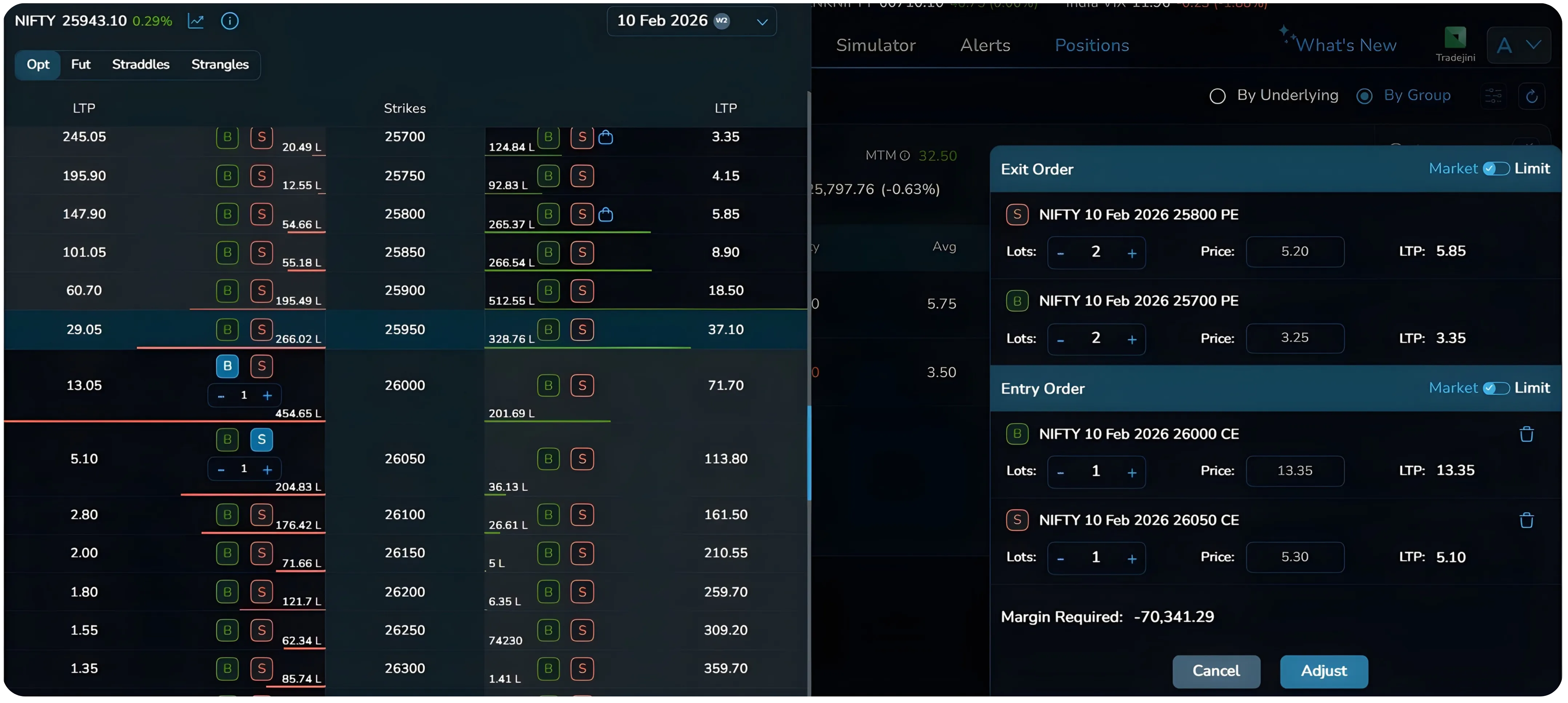
You can adjust the number of lots using the plus and minus buttons next to each position. Notice in the example how the exit orders show 2 lots while the entry orders show 1 lot—you can reduce or increase position size as part of the adjustment. You can also choose between Market orders for immediate execution or Limit orders for better price control, depending on current market conditions and your urgency.
Executing the Adjustment
Once everything is configured to your satisfaction, take a final moment to review all strikes, quantities, and the margin impact. Then click the blue "Adjust" button located at the bottom right. NxtOption executes everything simultaneously; closing all your exit orders and opening all your entry orders in one coordinated action. The platform executes multi-leg orders instantly using its real-time position adjustment engine. In this example, four separate actions happen seamlessly: closing the 25800 PE short, closing the 25700 PE long, opening the 26000 CE long, and opening the 26050 CE short. All done through one button click.
Key Features of Group Adjust
What makes this feature so powerful is how it brings everything together in one place. You get real-time margin calculation before you commit, so there are no surprises. The integrated option chain means you don't need to jump between screens; everything you need to select new positions is right there. All legs execute together in a coordinated manner, reducing slippage and execution risk. The visual layout is clear and intuitive, with exit and entry sections clearly separated so you always know what's closing and what's opening.
When to Use Group Adjust
This feature shines when the market moves against your original thesis and you want to pivot direction, when you need to roll positions to different expiries, when strike selection needs adjustment based on changed price levels, or when you want to reduce or increase position size while restructuring. It's also invaluable when volatility has changed and different strategies are now more attractive, or when you're converting from one setup to another entirely. It is especially useful when managing losing option trades or restructuring strategies due to volatility shifts.
Important Things to Keep in Mind
Before selecting new strikes, always check the volume numbers in the option chain. The difference between a high-volume strike and a zero-volume strike is huge—wide bid-ask spreads on illiquid strikes can completely negate the benefits of your adjustment. Remember that each leg involves brokerage, exchange charges, and taxes. In this example, you're executing four separate trades, so make sure the strategic benefit justifies these costs.
Timing matters too. Avoid the first and last 15 minutes of trading when volatility is typically highest—mid-session usually offers better execution quality. And while Group Adjust makes execution easy, you still need to understand the risk profile of what you're entering. Know your breakevens, maximum loss, and profit potential before you commit.
Most importantly, have conviction. Don't adjust just because you're losing money. Use this feature when you genuinely believe the restructured position makes strategic sense based on changed market conditions or new information.
The Bottom Line
NxtOption's Group Adjust feature streamlines what used to be a complex, error-prone process. Converting positions, adjusting strikes, changing direction; all of it happens through one well-designed interface. The screenshot example shows a complete transformation from one setup to another, demonstrating how you can pivot your entire position with just a few clicks.
As a trade management tool, Group Adjust simplifies complex options restructuring decisions. You see exactly what you're closing, exactly what you're opening, and exactly how it impacts your margin—all before you execute. Whether you're making small tweaks or complete overhauls to your positions, Group Adjust puts that control at your fingertips. Use it wisely, and it becomes one of the most valuable tools in your trading arsenal.
Explore NxtOption to manage, adjust, and analyse option positions with clarity, precision, and control.
Disclaimer: The information provided in our blogs is for informational purposes only and should not be construed as financial, investment, or trading advice. Trading and investing in the securities market carries risk. Always conduct your own research and consult with a qualified financial advisor before making any investment decisions. Past performance is not indicative of future results. Copyrighted and original content for your trading and investing needs.
© 2026 — Tradejini. All Rights Reserved.


