

Most options traders do not lose money because of poor strategy selection. They lose money because managing live multi-leg strategies is inefficient. This challenge is not about choosing the right strategy but about managing execution, risk, and responding to changing market conditions in real time.
Once a strategy is deployed, traders are forced to track individual legs, mentally combine premiums, estimate breakevens, and infer risk from scattered data points. As the market moves, Greeks shift silently and premium dynamics change faster than manual monitoring can keep up. Execution adds another layer of complexity. Entering or exiting legs one by one introduces sequencing risk, partial fills, and pricing mismatches.
The problem is not analysis. The problem is live strategy management.
Strategy Watch is built to solve this specific gap. It replaces fragmented leg-level tracking with a unified, strategy-first monitoring and execution layer.
What is Strategy Watch in NxtOption
Strategy Watch is the live strategy workspace inside NxtOption. It is the default landing screen when you log in because it represents where active trading decisions are made.
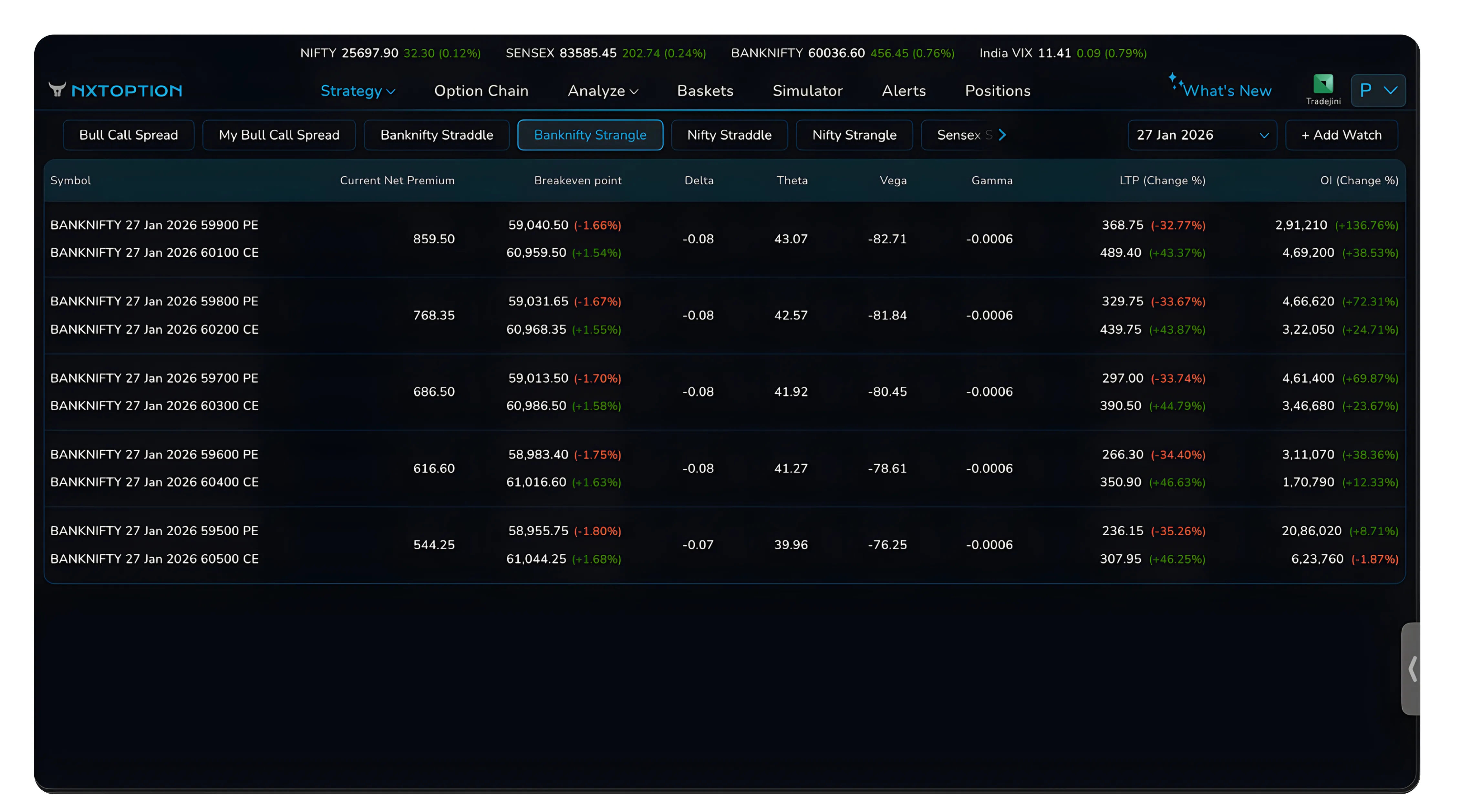
At its core, Strategy Watch allows traders to monitor, compare, and execute complete multi-leg option strategies in real time. Instead of tracking individual options, the platform treats a strategy as a single object with consolidated pricing, risk metrics, and execution controls. In simple terms, Strategy Watch acts as a strategic watch system for options traders, helping them monitor positions with clarity and respond quickly to evolving market environments.
Strategy Watch is not a scanner and not a builder. It sits between analysis and execution. Strategies are defined elsewhere, but once they are deployed into Strategy Watch, they are managed entirely from this screen.
Key Capabilities
Strategy Watch provides real-time strategy-level pricing and risk metrics, including net premium, breakeven points, and aggregated Greeks. It supports predefined and user-created strategy structures and allows the same strategy to be deployed across multiple underlyings. It enables one-click multi-leg execution, direct access to strategy modification, and alert-based monitoring without constant screen time.
The feature is designed to reduce reaction time, eliminate execution errors, and allow traders to think in terms of systems rather than individual trades. This structured approach improves decision making, enhances risk awareness, and helps traders maintain a sound strategy even in volatile markets.
Inside Strategy Watch: How It Works
Strategy Watch is organised around Strategy Watch headers and groups.
A Strategy Watch header represents a strategy idea. A group represents a live deployment of that idea on a specific underlying and expiry.
This separation is deliberate and central to how the feature works. This structure mirrors how professional traders manage strategies across markets, helping them maintain consistency and strategic planning discipline.
Prebuilt Strategy Watches
Prebuilt Strategy Watch headers are provided by default. These include Banknifty Straddle, Banknifty Strangle, Nifty Straddle, Nifty Strangle, and Sensex equivalents.
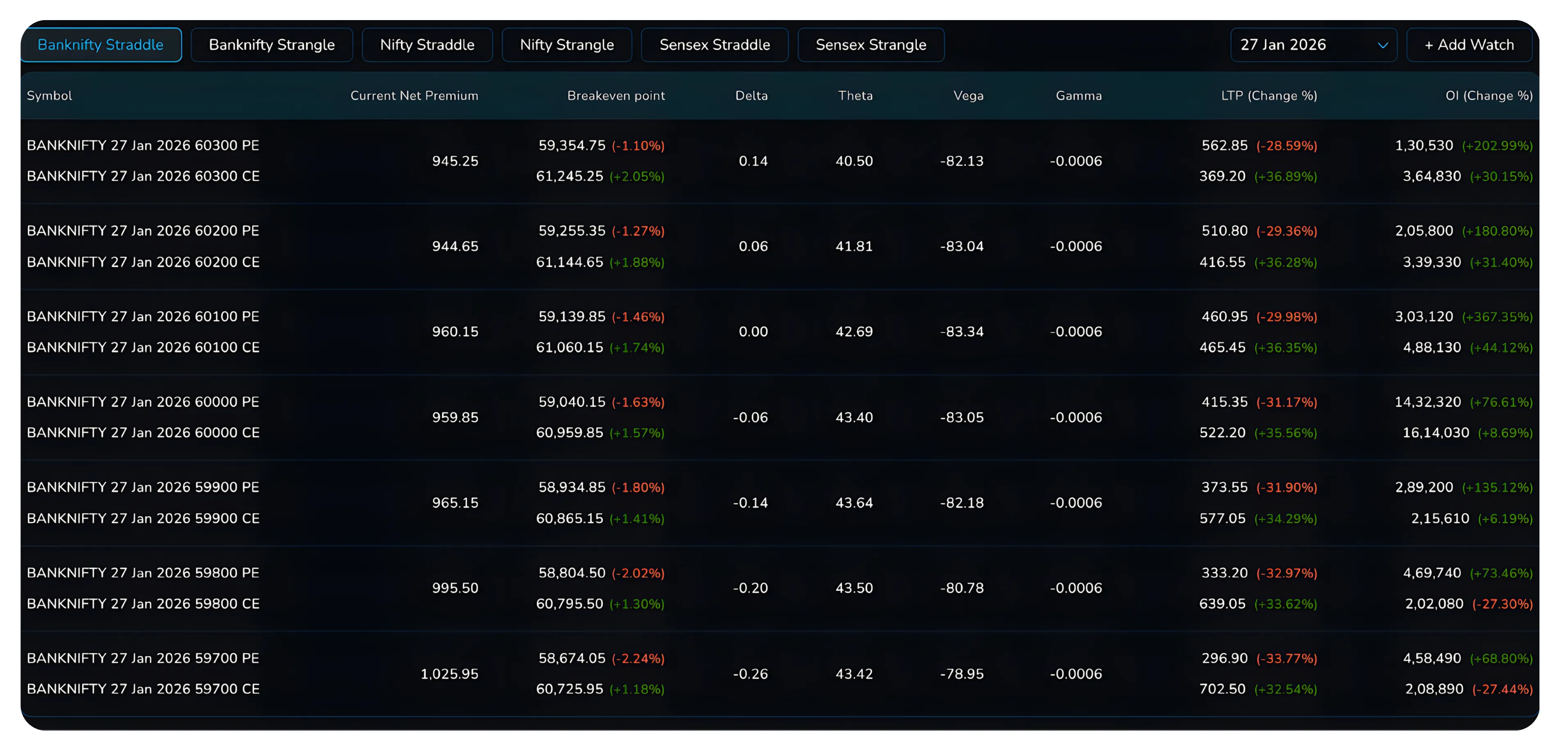
Each prebuilt header already contains groups created by NxtOption. The strikes are selected using liquidity, volatility, and proximity-to-ATM logic. These headers allow traders to instantly observe how commonly traded strategies are priced and behaving without creating anything manually. These predefined structures reflect commonly used competitive strategies used by active traders to adapt to liquidity and volatility shifts.
They are reference-ready and execution-ready.
Custom Strategy Watches
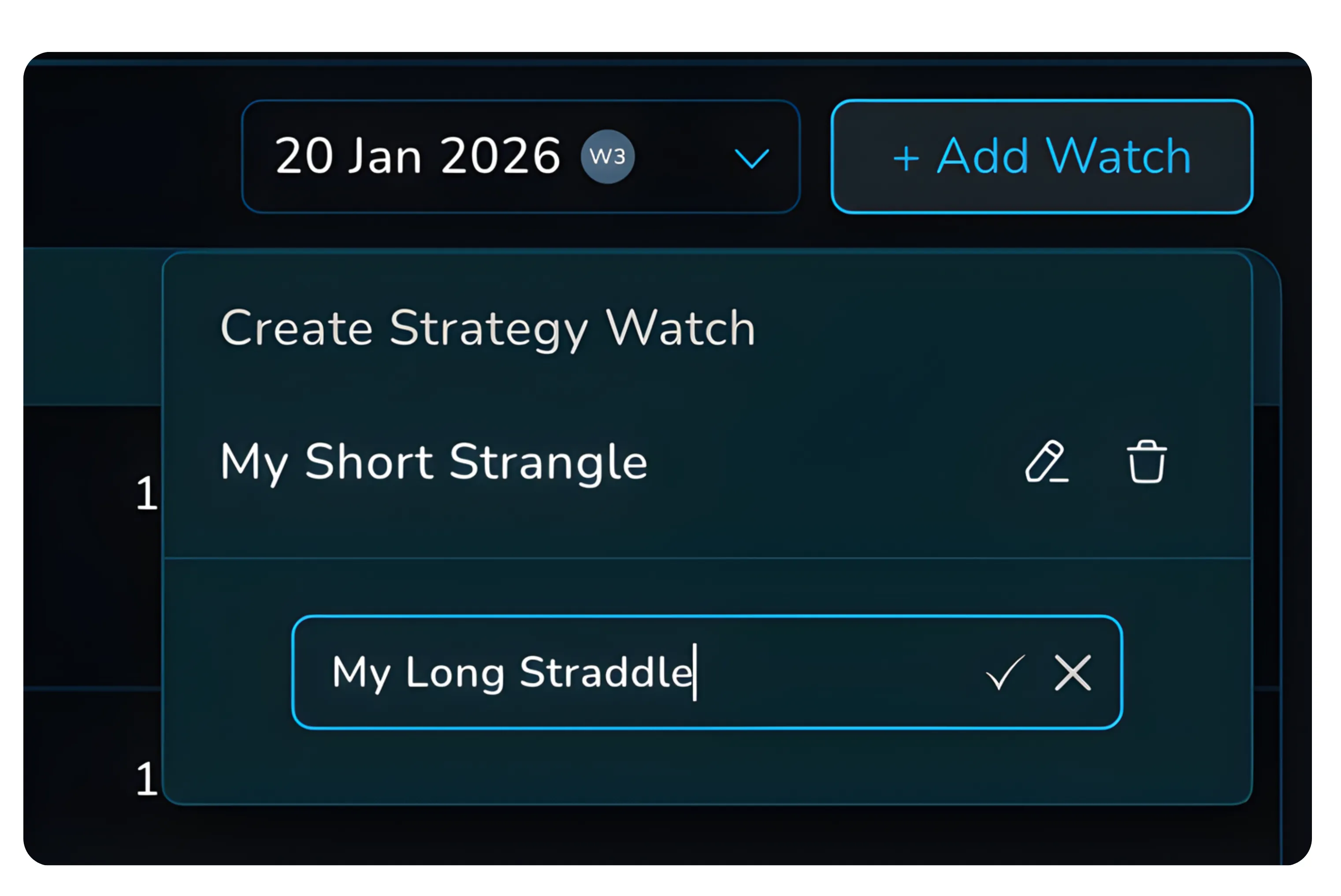
Users can create their own Strategy Watch headers using the + Add Watch option.
Creating a custom header does not create a strategy or trade. It only creates an empty container representing a strategy concept. For example, “My Long Straddle” or “Weekly Credit Spreads”.
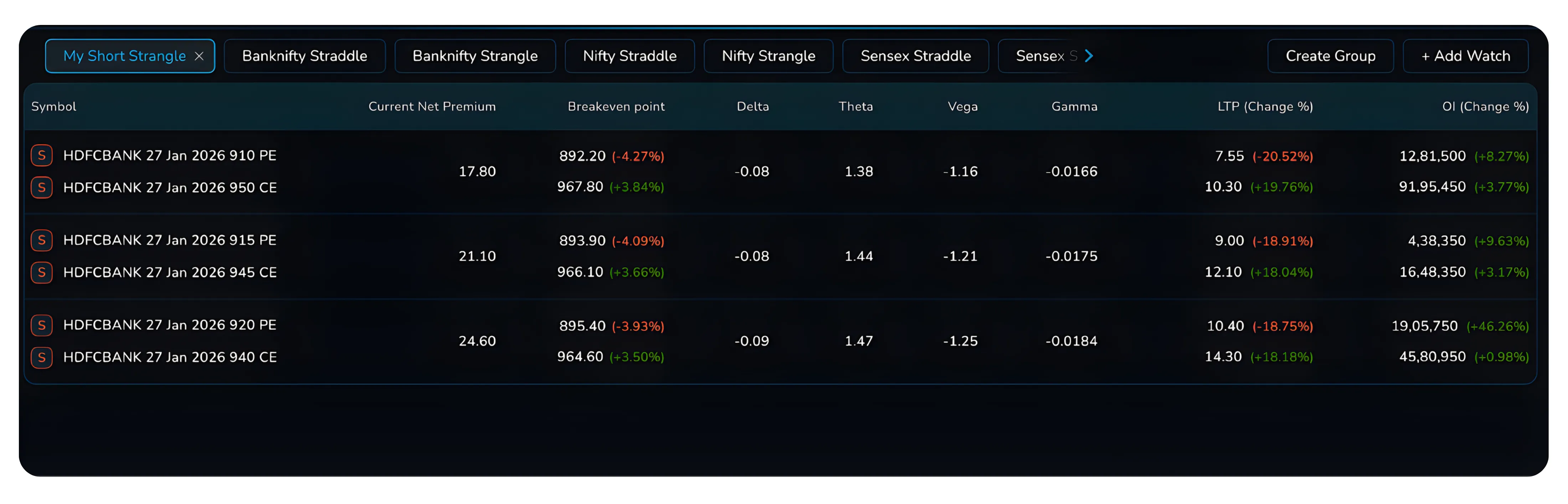
Strategies appear inside a header only after groups are created.
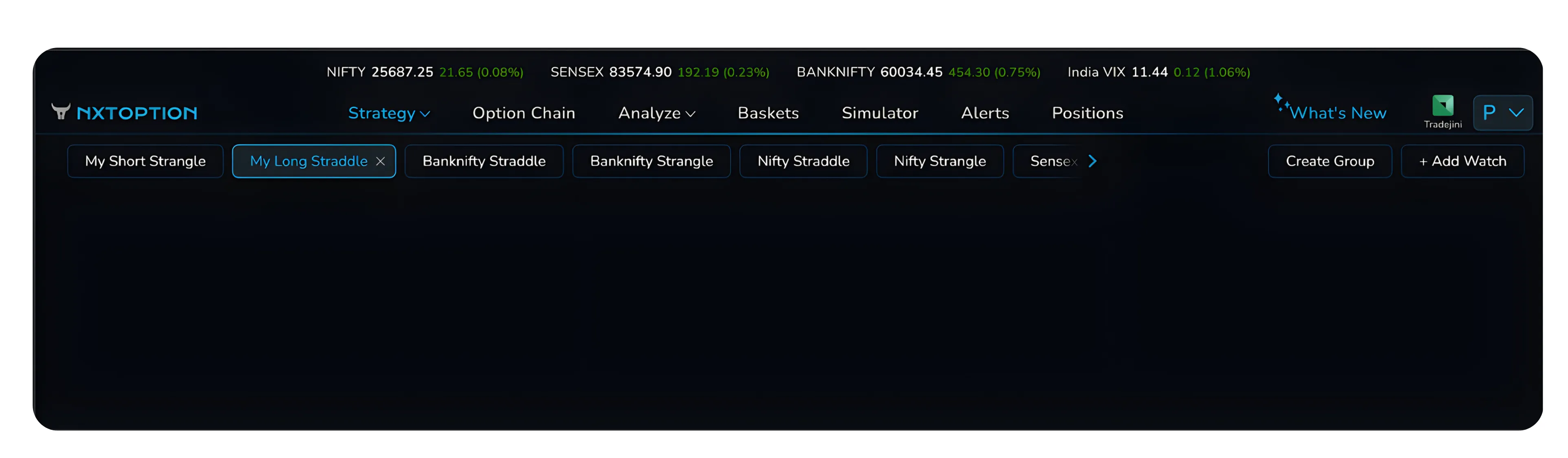
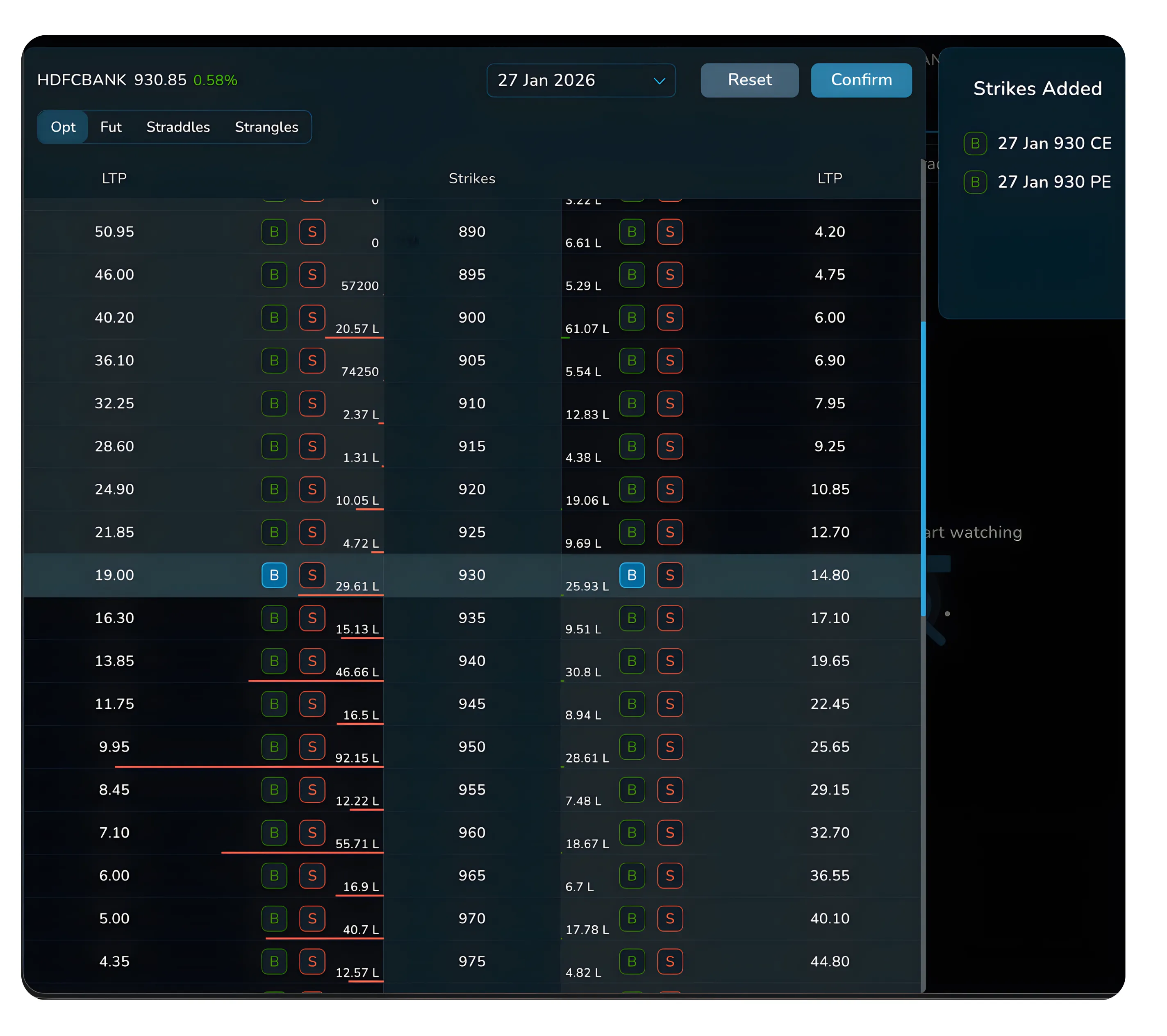
Inside a custom header, the user clicks Create Group. This opens the option selection interface where the underlying, expiry, and legs are selected. Once confirmed, the selected legs are saved as a strategy group.
Multiple groups can be created inside the same header. This allows the same strategy structure to be applied across different underlyings without duplicating headers.
Strategy-Level Metrics That Matter
Strategy Watch prioritises strategy-level data over leg-level data.
Each group displays the current net premium, breakeven points, and aggregated Greeks. Delta reflects directional bias, Theta shows time decay impact, Vega measures volatility sensitivity, and Gamma highlights acceleration risk.

Leg-level prices and open interest are still visible, but only to support diagnostics and adjustments. The primary decision-making layer remains the strategy as a whole.
All values update in real time without manual refresh. Understanding these metrics helps traders evaluate risk, identify directional bias, and maintain a good strategy aligned with market behavior.
Expiry Selector
The expiry selector controls the expiry context for the active Strategy Watch header.
Switching expiries recalculates premium, breakevens, and Greeks for every group in the header. This allows traders to compare how the same strategy behaves across weekly, monthly, quarterly, and long-dated expiries without rebuilding or redefining anything.
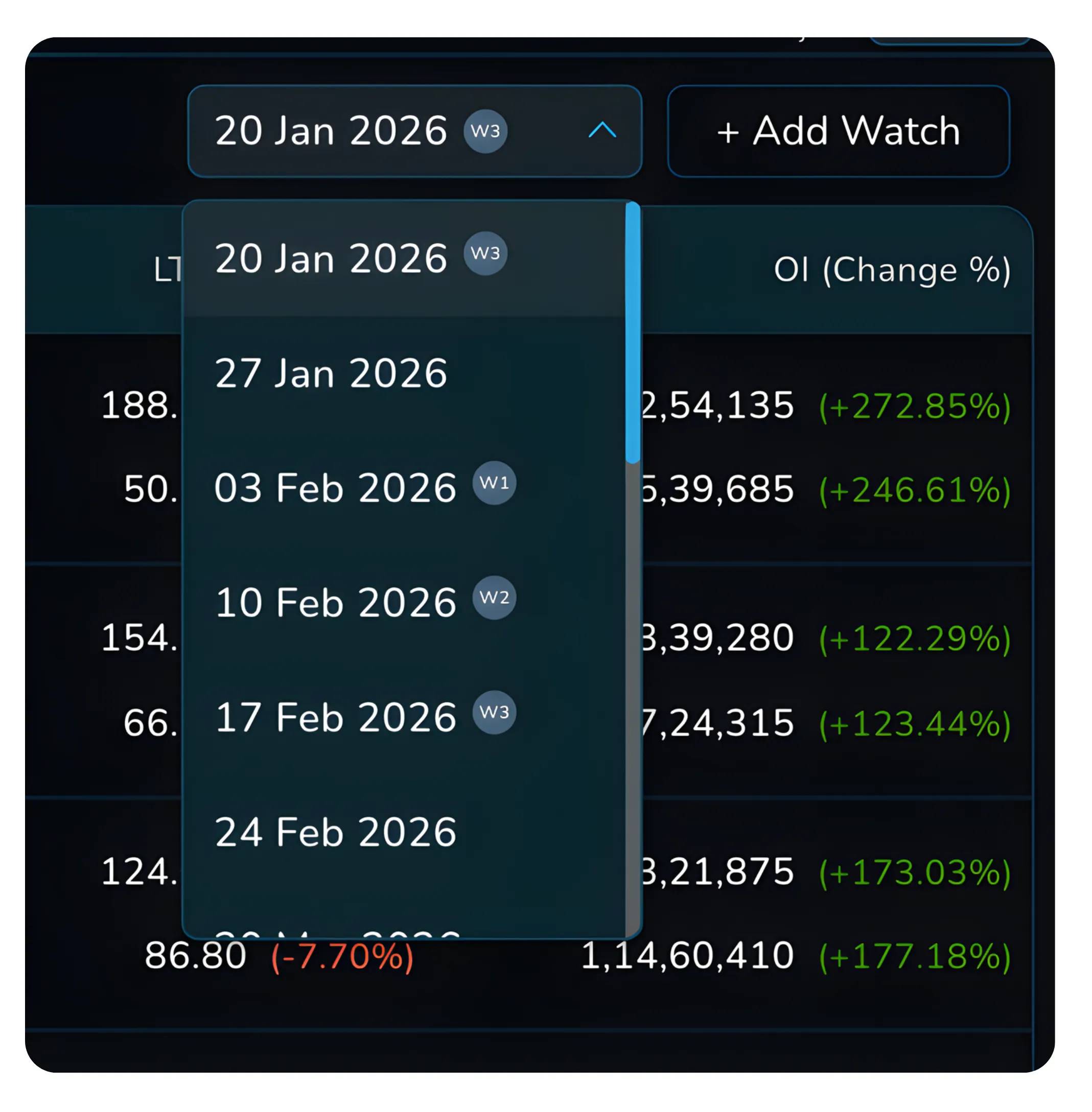
This is especially useful for evaluating theta decay, volatility exposure, and cost compression across time horizons. Comparing expiries allows traders to evaluate cost efficiency, volatility exposure, and select the right strategy for varying time horizons.
Also read: NxtOption Alerts for Smarter Strategy-Level Monitoring. Set alerts on P&L, premium, and Greeks so you can respond to risk changes without constantly watching your screen.
Execution and Control: The Five Action Buttons
Each strategy group in Strategy Watch is execution-enabled.

Hovering over a group reveals five actions.
Long opens a pre-filled multi-leg order pad to enter the strategy as defined.
Short opens the reverse structure using the same legs.
Strategy Builder opens the exact legs in Strategy Builder for payoff analysis and modification.
Set Alert allows alerts based on P&L, premium levels, or Greek thresholds.
Premium Charts displays historical premium behaviour for the same strategy structure.
All execution is coordinated across legs, reducing sequencing risk and pricing mismatch. Coordinated execution ensures pricing efficiency and reduces errors, helping traders maintain a disciplined and successful strategy execution process.
How to Create Your Custom Strategy Watch
Creating a custom Strategy Watch follows a two-step process.
First, create a Strategy Watch header using + Add Watch and give it a meaningful name. At this stage, the header is empty.
Second, enter the header and click Create Group.
Select the underlying, expiry, and option legs that form the strategy. Confirm the selection to create the group.
This process can be repeated multiple times inside the same header to deploy the same strategy across different underlyings.
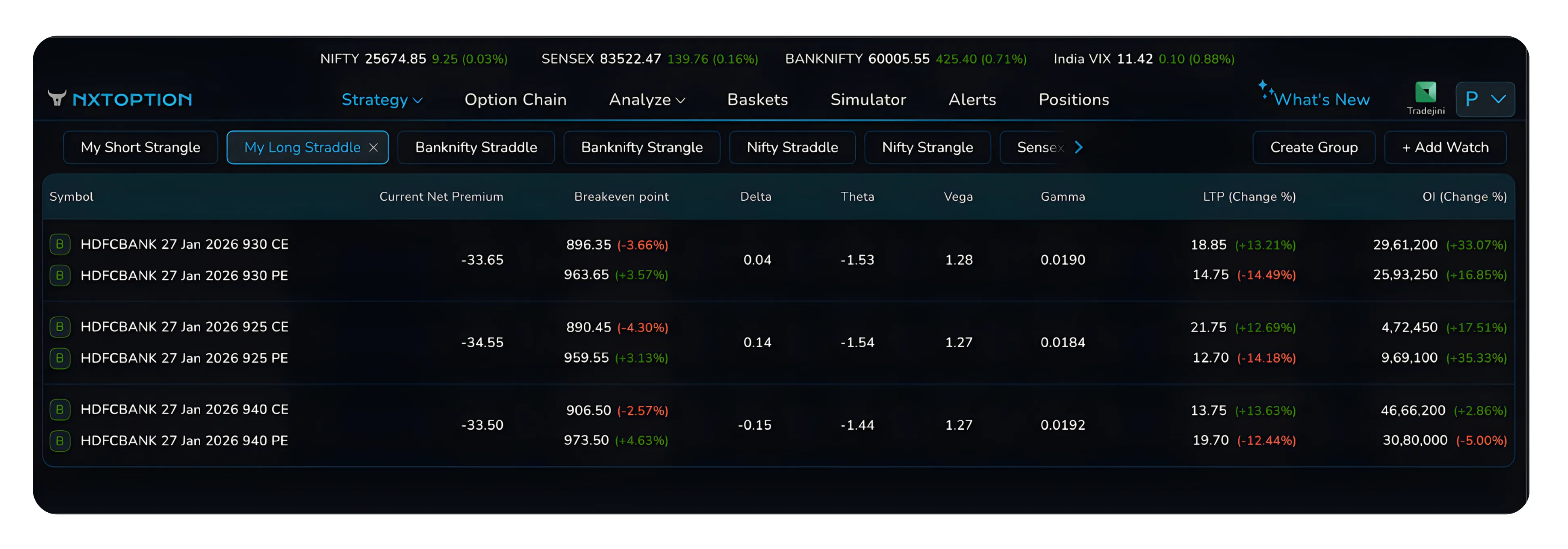
Once a group is created inside a custom Strategy Watch header, the execution and analysis panel changes compared to the pre-built Strategy Watch views. This change reflects how custom strategies are defined and managed. In pre-built Strategy Watches, the platform keeps the structure direction-agnostic. The same straddle or strangle can be entered either long or short, so the interface provides separate Long and Short buttons.
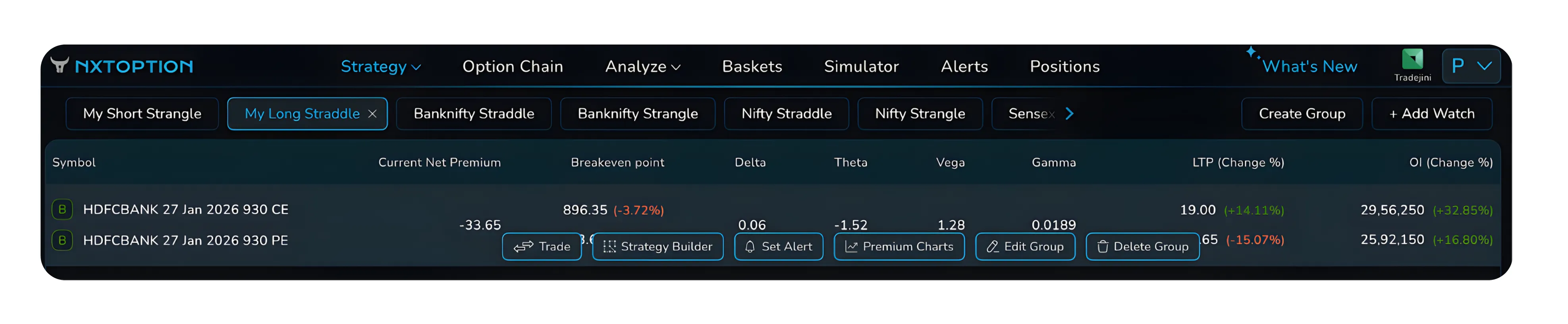
In a custom Strategy Watch, direction is already fixed at the time of group creation. While creating the group, you explicitly choose whether each leg is bought or sold. Because the strategy’s direction is predefined, Strategy Watch does not need to offer directional entry choices again. This is why the Long and Short buttons are removed once a custom group is added.
Instead, a single Trade button is shown. This button executes the strategy exactly as it has been defined in the group, using the same buy and sell legs selected earlier. Two additional controls also appear. Edit Group allows you to modify the existing legs without creating a new header, while Delete Group removes the group entirely. This ensures custom strategies remain structured, intentional, and aligned with the trader’s defined risk framework.
Strategy Builder is used for analysis and modification, but strategies appear in Strategy Watch only through group creation.
Settings and Parameters at a Glance
| Parameter | Options | Purpose | Best Practice |
|---|---|---|---|
| Expiry Selection | Weekly to Long-dated | Time horizon control | Match expiry to strategy objective |
| Quantity | Lots | Position sizing | Scale after alert confirmation |
| Alerts | P&L, Greeks, Premium | Automated monitoring | Use alerts to avoid screen-watching |
| Execution Mode | Market, Limit, SL | Order control | Market for entry, limit for exits |
Proper parameter selection supports consistency, improves risk control, and strengthens the overall strategy management process.
Also read: How to Use the MultiStrike OI Chart on NxtOption. Track strike-wise open interest shifts to spot support, resistance, and positioning changes before they impact your strategy.
Accessing Strategy Watch
Strategy Watch opens by default when you log in to NxtOption from the Tradejini CubePlus platform.
Users can switch between Strategy Watch headers using the tab bar at the top of the screen. Expiry selection, group creation, and execution controls are all accessible from within the same view, without navigating to other modules. By centralizing execution and monitoring, Strategy Watch enhances workflow efficiency and strategic responsiveness.
No additional setup is required.
Bottom Line and Conclusion
Strategy Watch is built for traders who think in strategies, not individual options.
It separates strategy ideas from strategy deployments, consolidates live risk and pricing into a single view, and enables fast, coordinated execution. By removing fragmentation between analysis, monitoring, and execution, it allows traders to manage complexity without increasing cognitive load. In fast-moving markets, having a structured strategy monitoring system can be the difference between reactive trading and disciplined execution.
Once the structure is understood, Strategy Watch becomes the central operating layer for options trading on NxtOption.
Explore NxtOption to manage, adjust, and analyse option positions with clarity, precision, and control.
Disclaimer: The information provided in our blogs is for informational purposes only and should not be construed as financial, investment, or trading advice. Trading and investing in the securities market carries risk. Always conduct your own research and consult with a qualified financial advisor before making any investment decisions. Past performance is not indicative of future results. Copyrighted and original content for your trading and investing needs.
© 2026 — Tradejini. All Rights Reserved.


