

We’ve made it easier than ever to start investing in mutual funds, right from your CubePlus account. Whether you're a first-time investor or someone looking to diversify your portfolio, this step-by-step demo will guide you through the entire process of investing in mutual funds on Tradejini’s platform. Let’s walk you through how it works.
Step 1: Log in to CubePlus
Start by logging into your CubePlus account using your registered credentials.
Step 2: Go to the Dashboard
Once logged in, you’ll land on the main dashboard, where you can view your overall portfolio and access key features.
Step 3: Click on Mutual Funds
On the top-right corner of the dashboard, you’ll find a tab Mutual Funds. Click on it to begin your mutual fund investment journey.
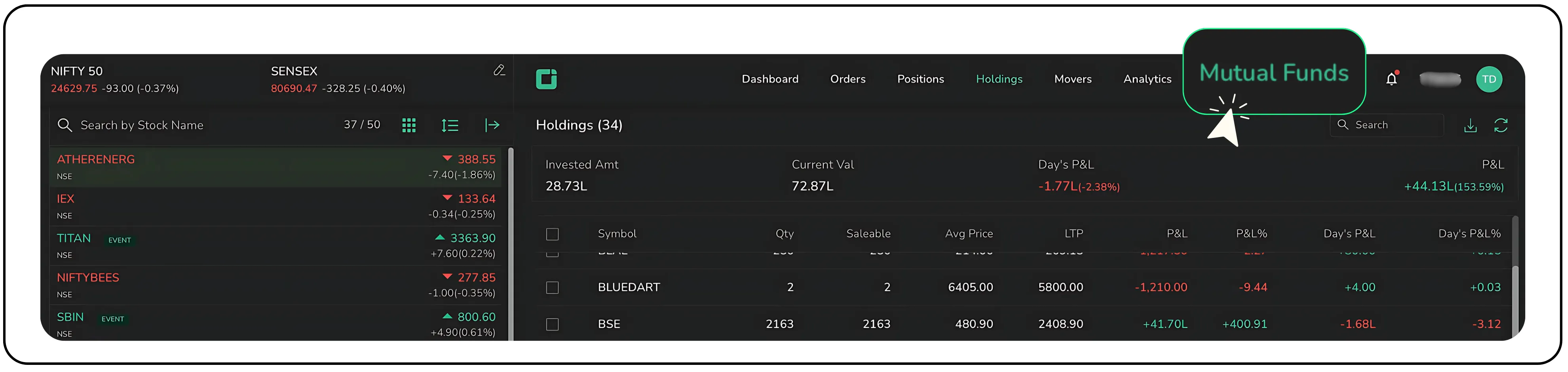
Step 4: Explore the Mutual Fund Dashboard
After clicking on the Mutual Funds tab, you will be taken to the dedicated mutual fund dashboard.
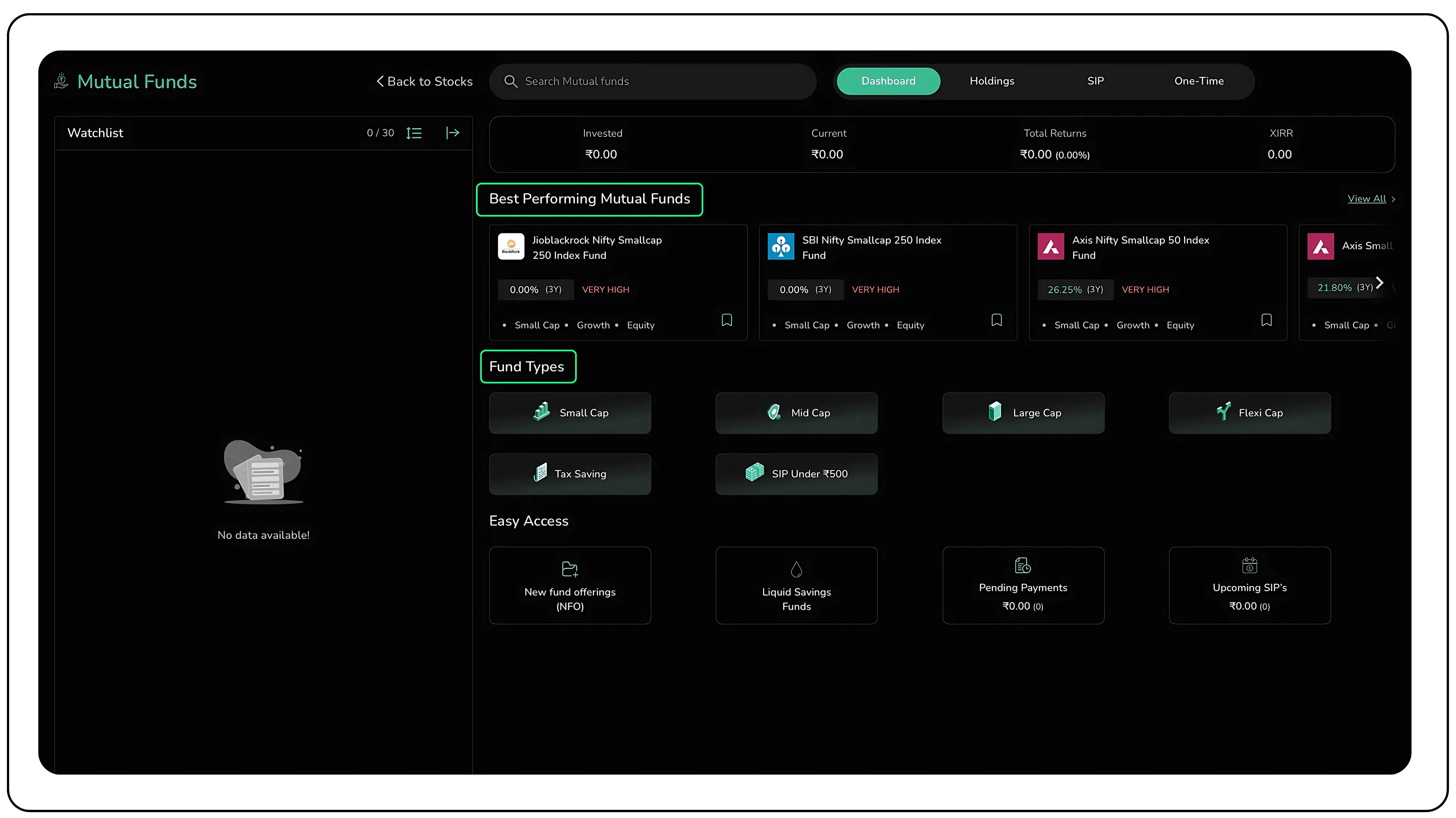
Here, you can view key details of your mutual fund portfolio, including:
- Invested Value: The total capital deployed into the investment over time.
- Current Value: The present market valuation of the investment portfolio.
- Total Returns: The net gain or loss, derived by subtracting the invested value from the current value.
- XIRR: The annualized rate of return that accurately reflects the timing and amount of each cash flow.
The dashboard also highlights top-performing mutual funds, along with categories such as Small Cap, Mid Cap, Large Cap, and more, making it easier to explore options based on your investment goals and risk profile.
Step 5: Use the Watchlist Feature to track funds
On the left side of your CubePlus dashboard, you’ll see the Watchlist section. This feature lets you keep an eye on mutual funds you're interested in, before making any investment decisions.
You can add up to 30 mutual funds to your watchlist, allowing you to easily track their performance, compare across categories, and plan your investments more confidently.
To add a Mutual fund to your watchlist, simply use the search bar to find the fund, then click the bookmark icon next to its name. The fund will be instantly added to your list for quick access and ongoing tracking.
.gif?alt=media&token=2686dd2f-501d-4e39-9993-a2ab2218e08a)
You can then expand any fund in your watchlist to view more details. By default, you’ll see the CAGR (Compound Annual Growth Rate) displayed across different time frames, helping you evaluate long-term performance at a glance.
Step 6: Customise Your Watchlist View
Click on Customize Columns to choose which data points appear like:
- Annual Returns
- SIP Returns
- NAV
- Risk
- Expense Ratio
.gif?alt=media&token=93ab574f-e996-4021-97d9-3c4291e24cb5)
Also read: Investing in Precious Metals Through ETFs in India
How to Invest in Mutual Funds via Lumpsum
If you prefer investing a one-time amount rather than setting up a recurring SIP, the lumpsum investment option on CubePlus makes it quick and straightforward. Here’s how you can invest in mutual funds through a lumpsum route.
Step 1: Search and Select the Fund
Start by searching for the mutual fund you want to invest in. Once you find it, click on the One-Time option displayed next to the fund.
Then, click on the Invest button to proceed with your lumpsum investment.
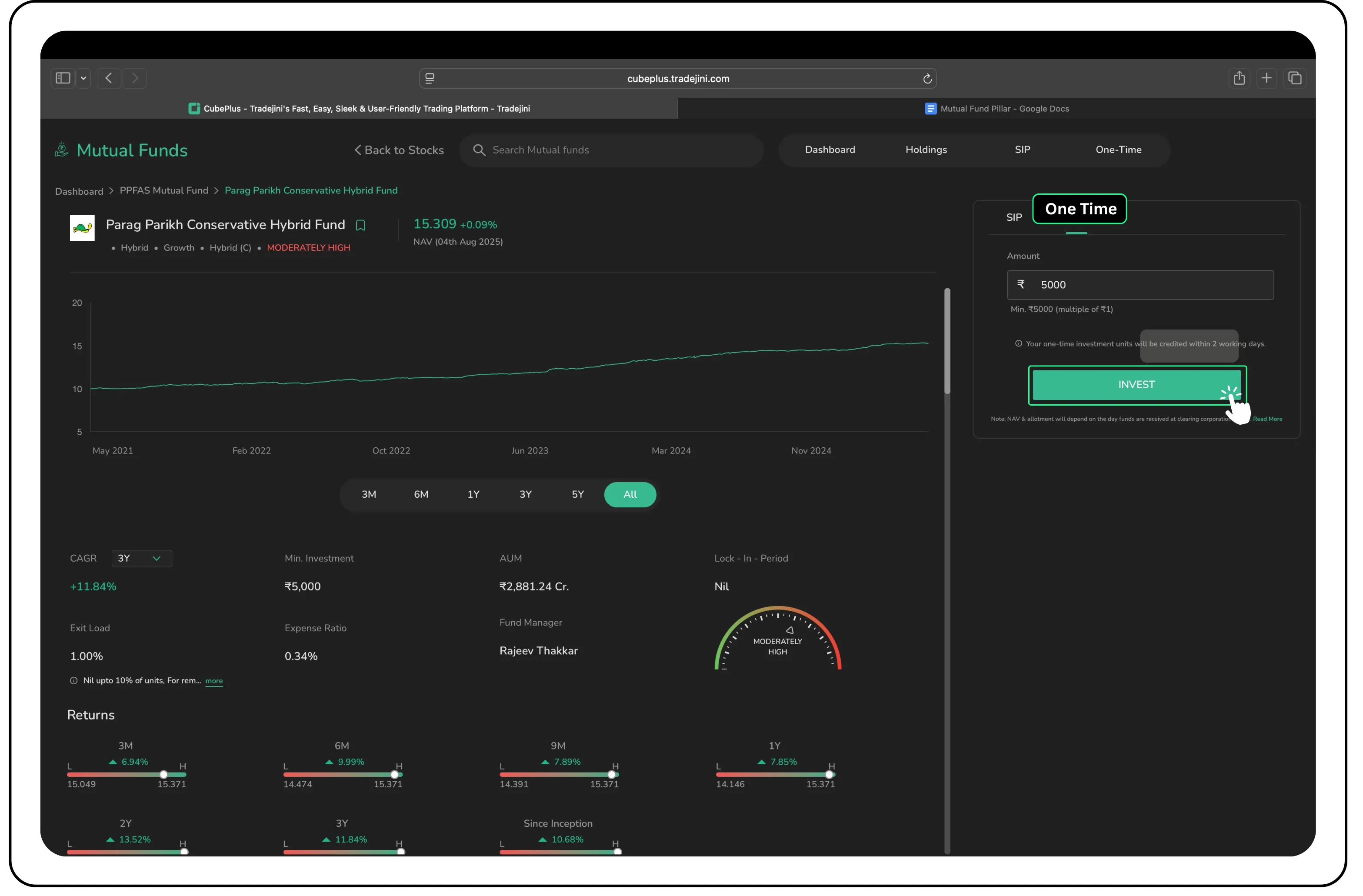
Step 2: Choose Payment Method
After clicking Invest, you will be redirected to the payment page.
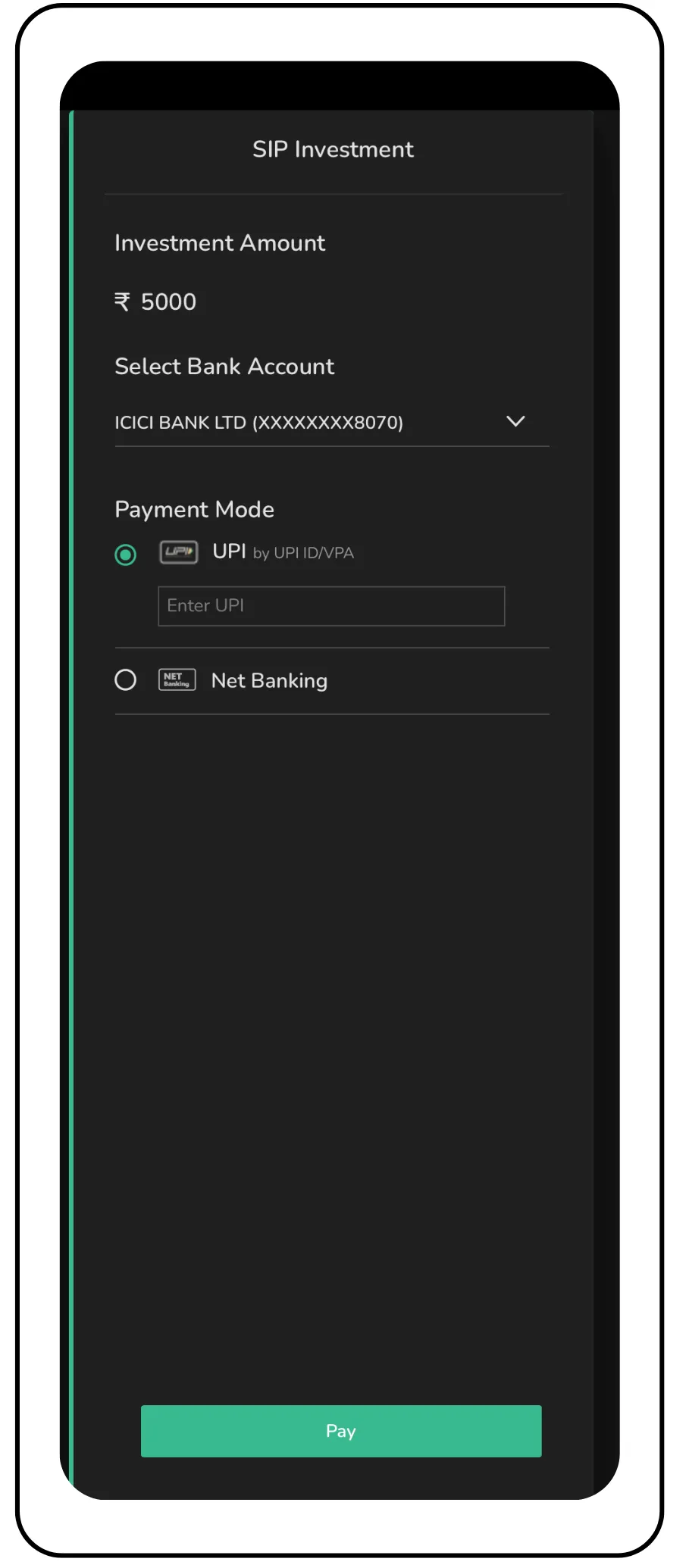
Select your preferred mode (like UPI or Net Banking) and complete the transaction. In this example, we have selected UPI as the preferred mode of payment for quick and secure processing.
Step 3: Confirm the Payment
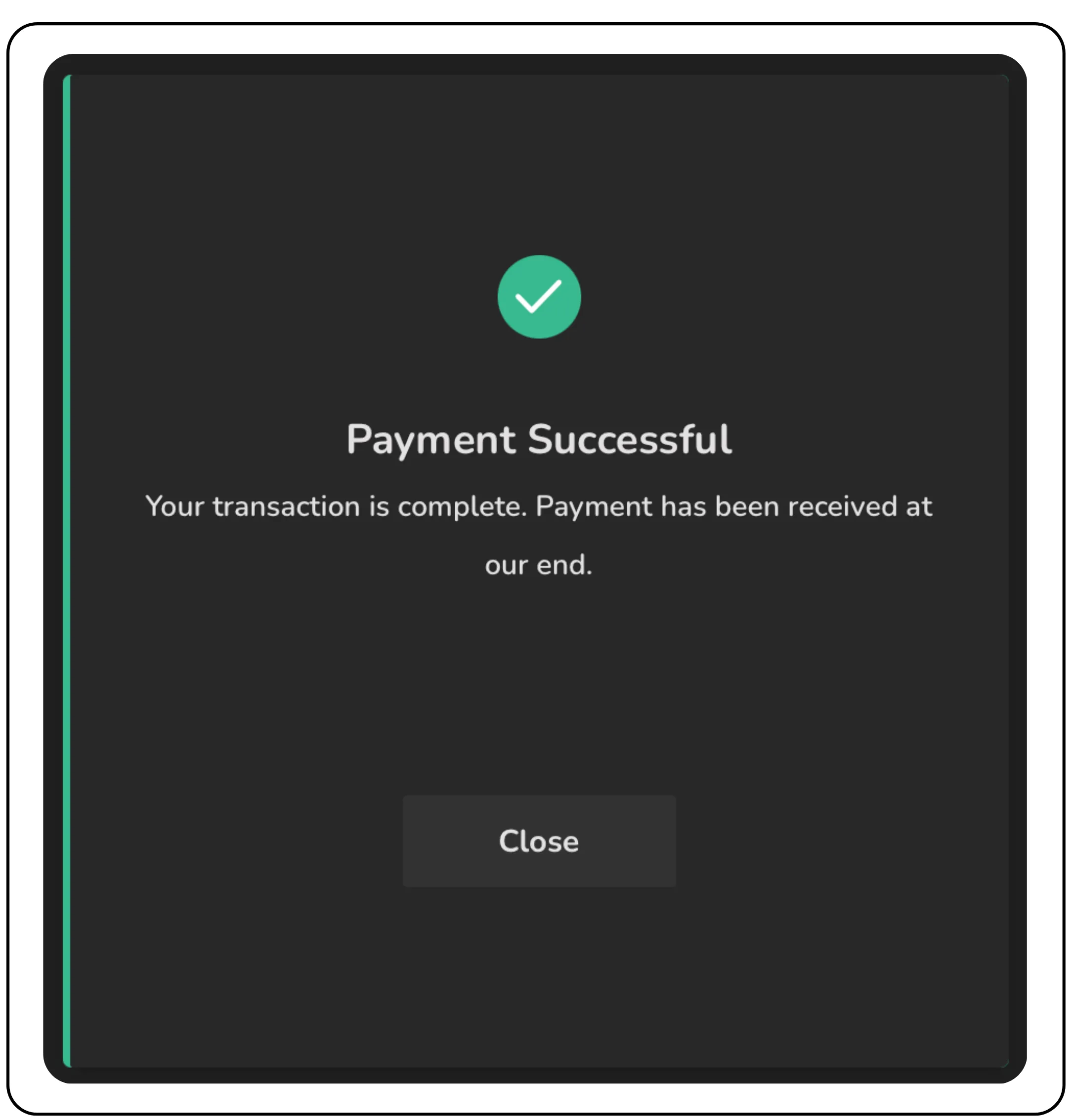
Once you approve the payment through your UPI-linked app, a payment confirmation page will appear on CubePlus.
This confirms that your transaction is successful. Your mutual fund units will typically be allotted and reflected in your portfolio within 3 working days.
How to Start a Mutual Fund SIP on CubePlus
If you are looking to invest regularly and build wealth gradually, Systematic Investment Plans (SIPs) are a smart way to go. CubePlus makes setting up an SIP simple and automated. Here's how you can start your SIP in just a few steps.
Step 1: Create a Mandate
On the main page, click on the SIP tab, then select Mandate, and click on Create New Mandate. You’ll be taken to the Mandate Creation page, where you also have the option to name your mandates.
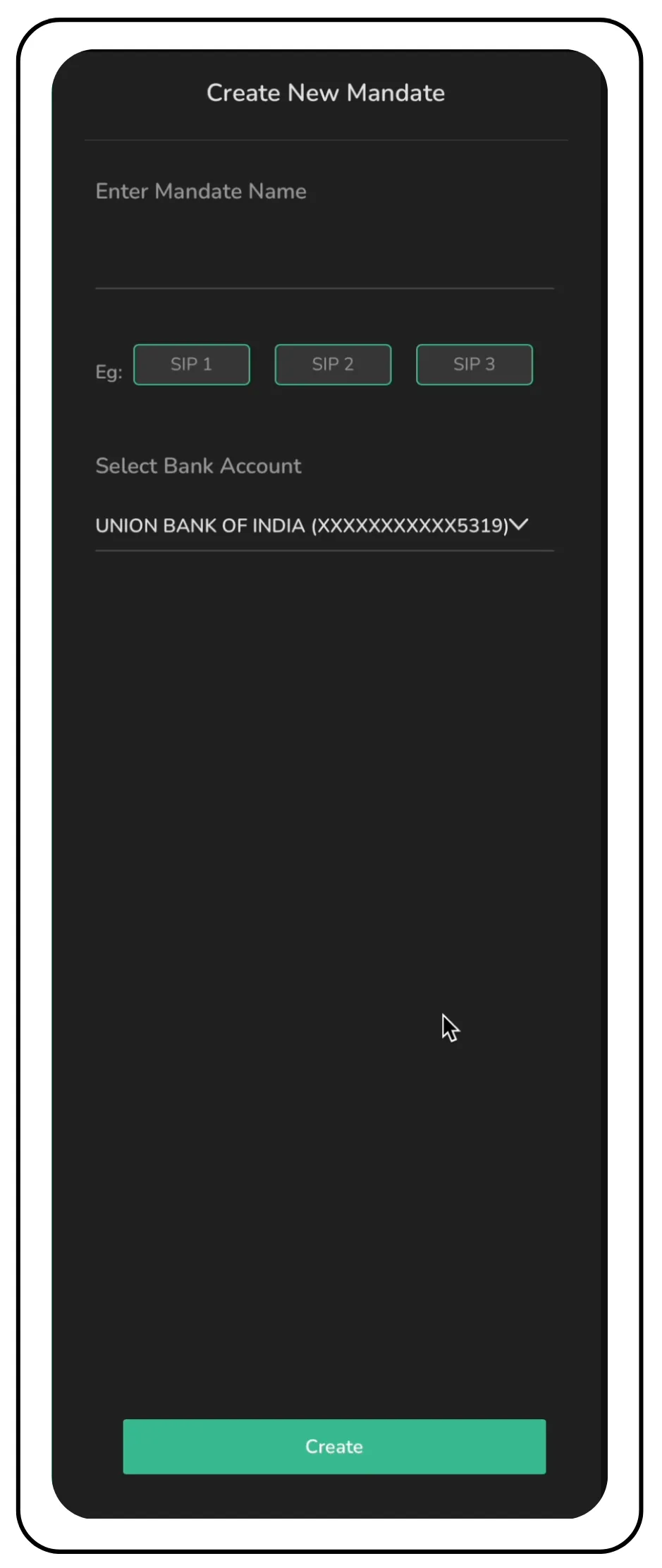
This is a one-time setup that authorizes automatic monthly deductions from your bank account. Once created, the same mandate can be used for all your future SIPs.
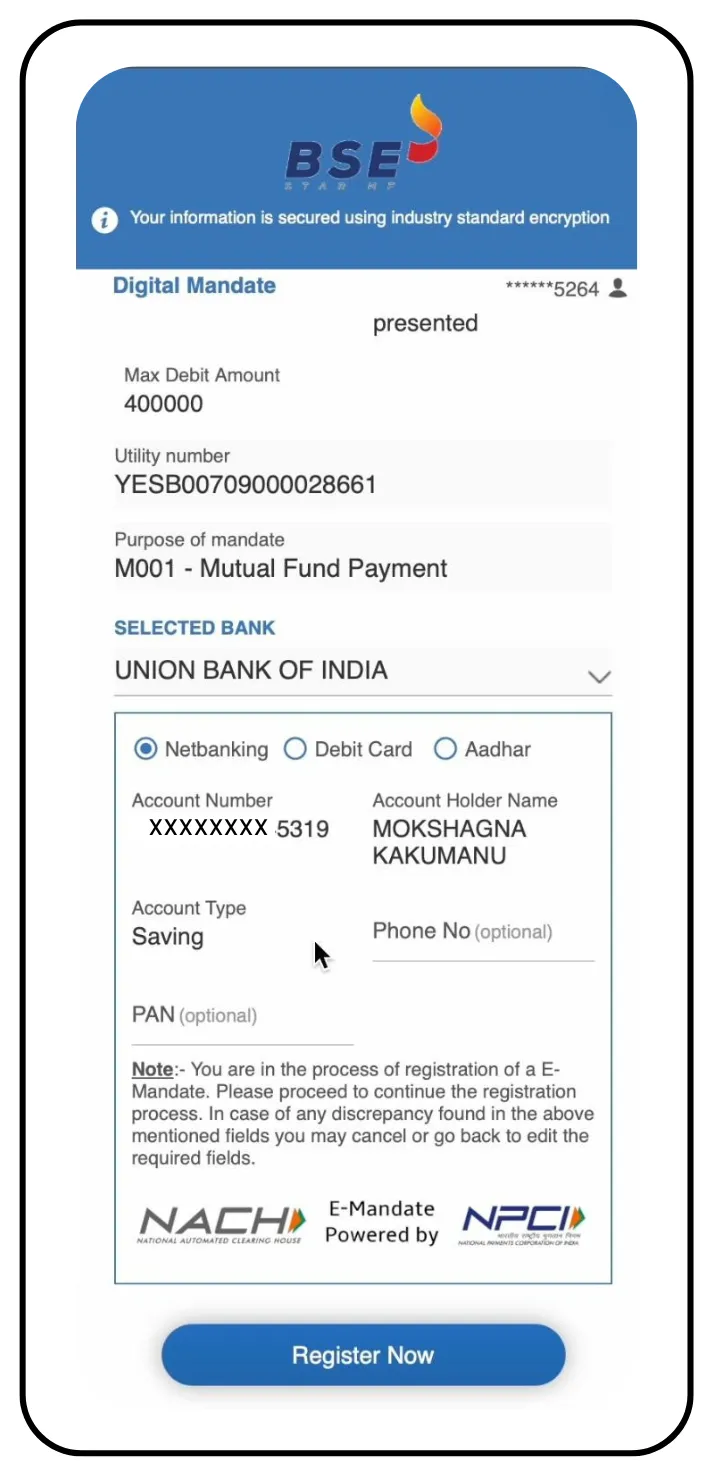
To register your SIP mandate, choose your preferred method: Net Banking, Debit Card, or Aadhaar.
Once you have made your choice, click on Register Now to continue.
Step 2: Complete the Mandate Registration
After clicking ‘Register Now,’ a confirmation page will appear, and you will be redirected to your selected payment method, for example, Net Banking, if that’s what you chose.
Follow the on-screen instructions to authorize the mandate with your bank. This is a one-time process and is required to enable automatic monthly SIP deductions. But if the mandate fails due to any issues, then the process has to be started again.
Step 3: Authorise and Confirm the Mandate
Log in to your Net Banking portal and complete the mandate registration as per your bank’s instructions.
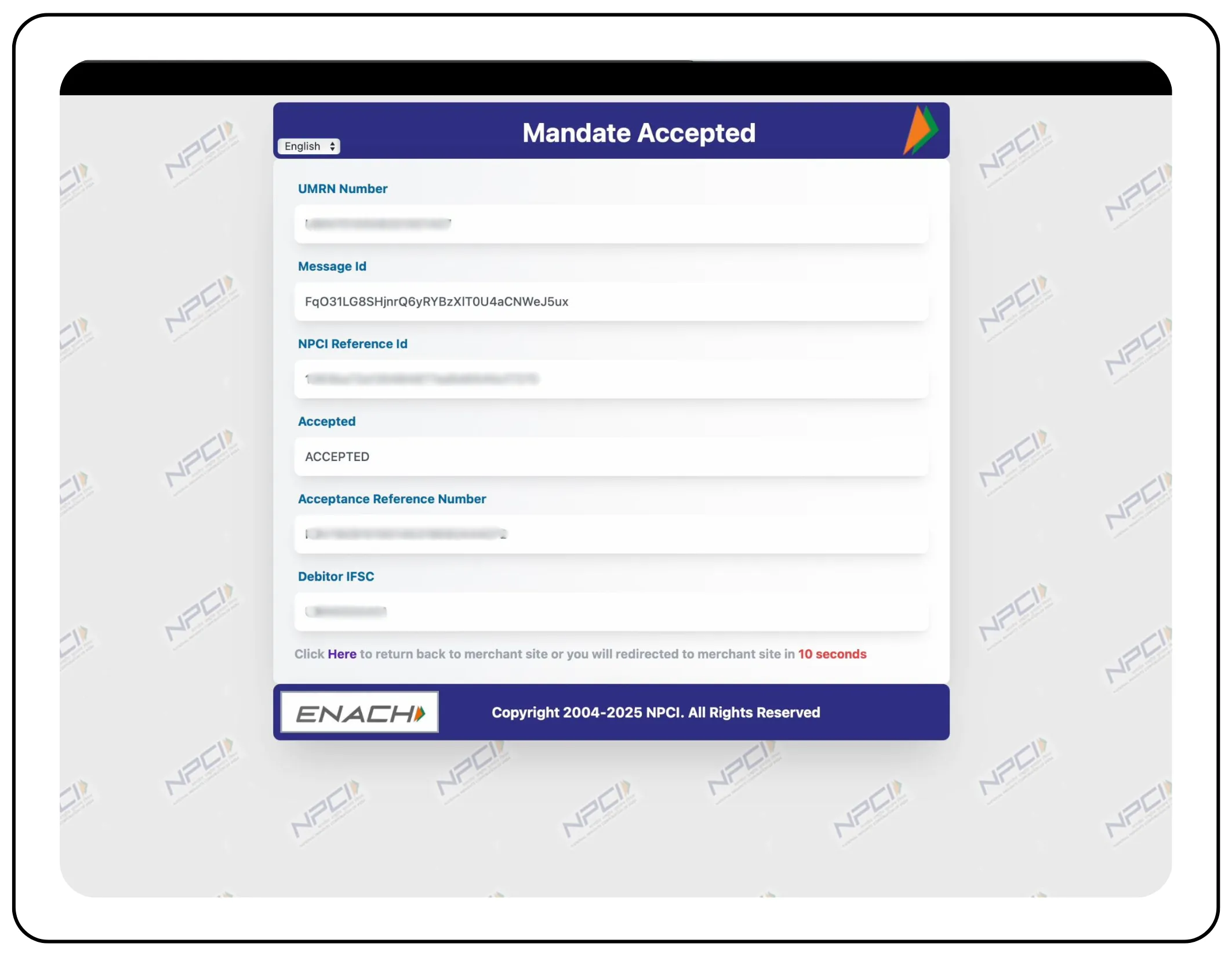
Once the process is successfully completed, you’ll be redirected back to CubePlus. You’ll see a confirmation screen indicating that your mandate has been approved.
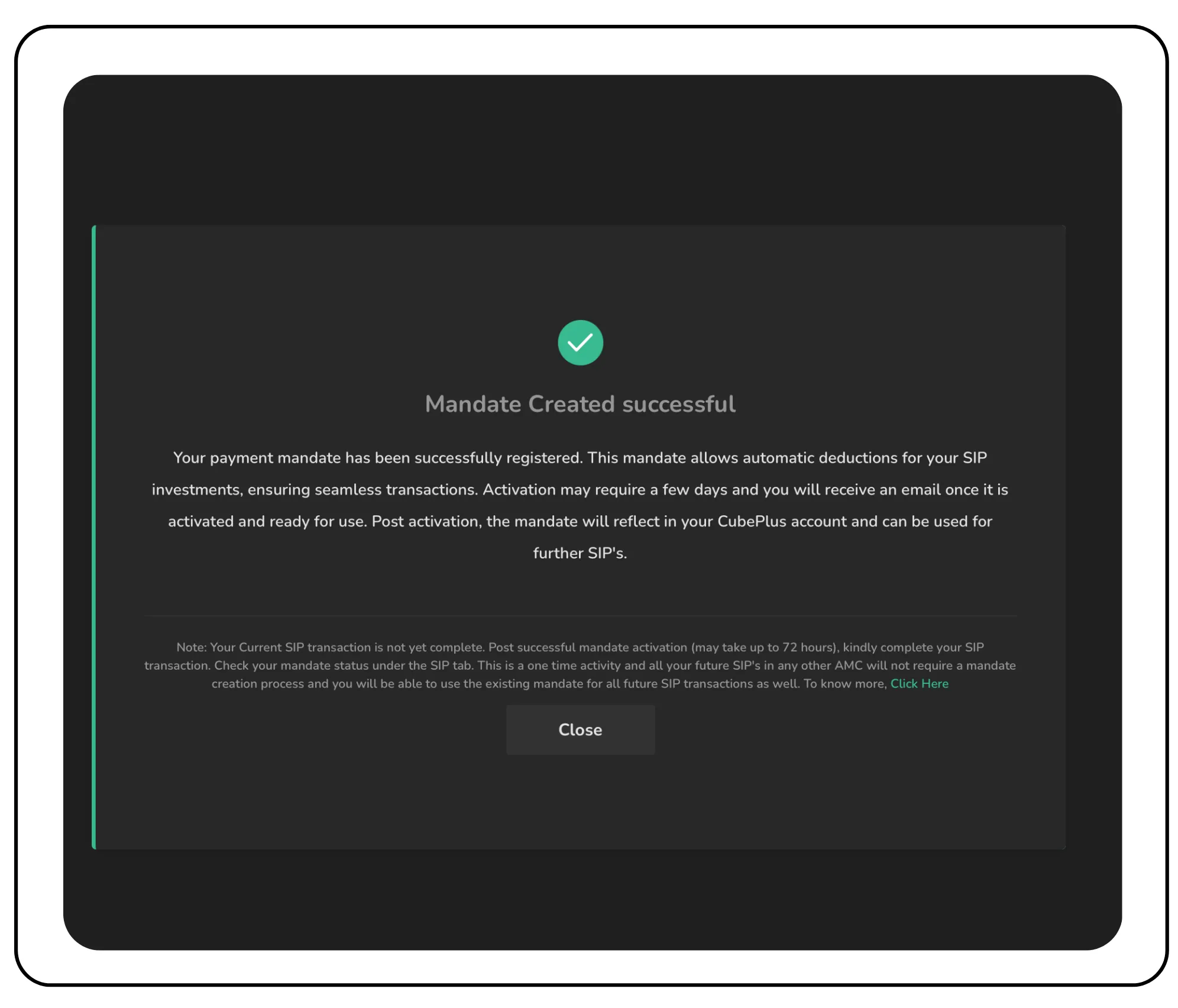
Once the mandate is active, your SIP will automatically run every month as per the amount and date you have chosen.
Step 4: Complete Your SIP Setup
At this stage, your SIP isn’t fully active yet, as the mandate approval can take up to 72 hours.
You can track the mandate status under the SIP tab by clicking on the Mandate section. Here you will see all your mandates listed as Approved, In Process, or Pending.
.gif?alt=media&token=a0e8cd71-9c3a-43dc-bfb7-984fc934e044)
This is a one-time setup. Once your mandate is approved, you won’t have to create a new one, even if you start SIPs in different mutual funds in the future. The same mandate will work seamlessly for all upcoming SIP investments.
Step 5: Search for the Fund
Let’s take ICICI Prudentia Regular Gold Savings Fund (FoF) as an example. Use the search bar to find the fund you want to invest in.
Once selected, you’ll be able to view all relevant details such as fund performance, category, returns, risk level, expense ratio, and more, helping you make an informed decision.
.gif?alt=media&token=dd857bdc-f03e-4ea4-b627-64cd896f7f4c)
Step 6: Set SIP Amount and Date
For the ICICI Prudentia Regular Gold Savings Fund (FoF), the minimum investment amount is ₹100, whether you are investing via SIP or lumpsum. To begin your SIP, click on the SIP option, enter the amount you want to invest each month (here ₹300 is the amount), and choose your preferred SIP date, which is the day of the month when the amount will be automatically debited from your bank account.
Important: The SIP date must be at least 30 days from today (the day you buy), otherwise, your first installment won’t be processed next month.
For example, if today is August 7 and you select September 5 as the SIP date, it doesn’t complete the 30-day gap. As a result, the September payment will be skipped, and your SIP will start only on October 5. To ensure your SIP starts on time, select a date that falls on or after September 7, in this case.
Step 7: Start the SIP
Once you’ve entered the SIP amount and selected your preferred date, click on Start SIP to proceed. You’ll be taken to the Mandate page, where you can choose an existing mandate that’s already been created. This mandate will be used to set up the SIP for the selected fund and can also be reused for multiple SIPs in the future.
Also read: Pharma Sector Mutual Funds: Diversified Investment Options
Viewing Your Mutual Fund Holdings on CubePlus
Once your investments are in place, whether through SIP or lumpsum, you can easily track them from your CubePlus dashboard. Here's how to view all the mutual fund holdings in your portfolio.
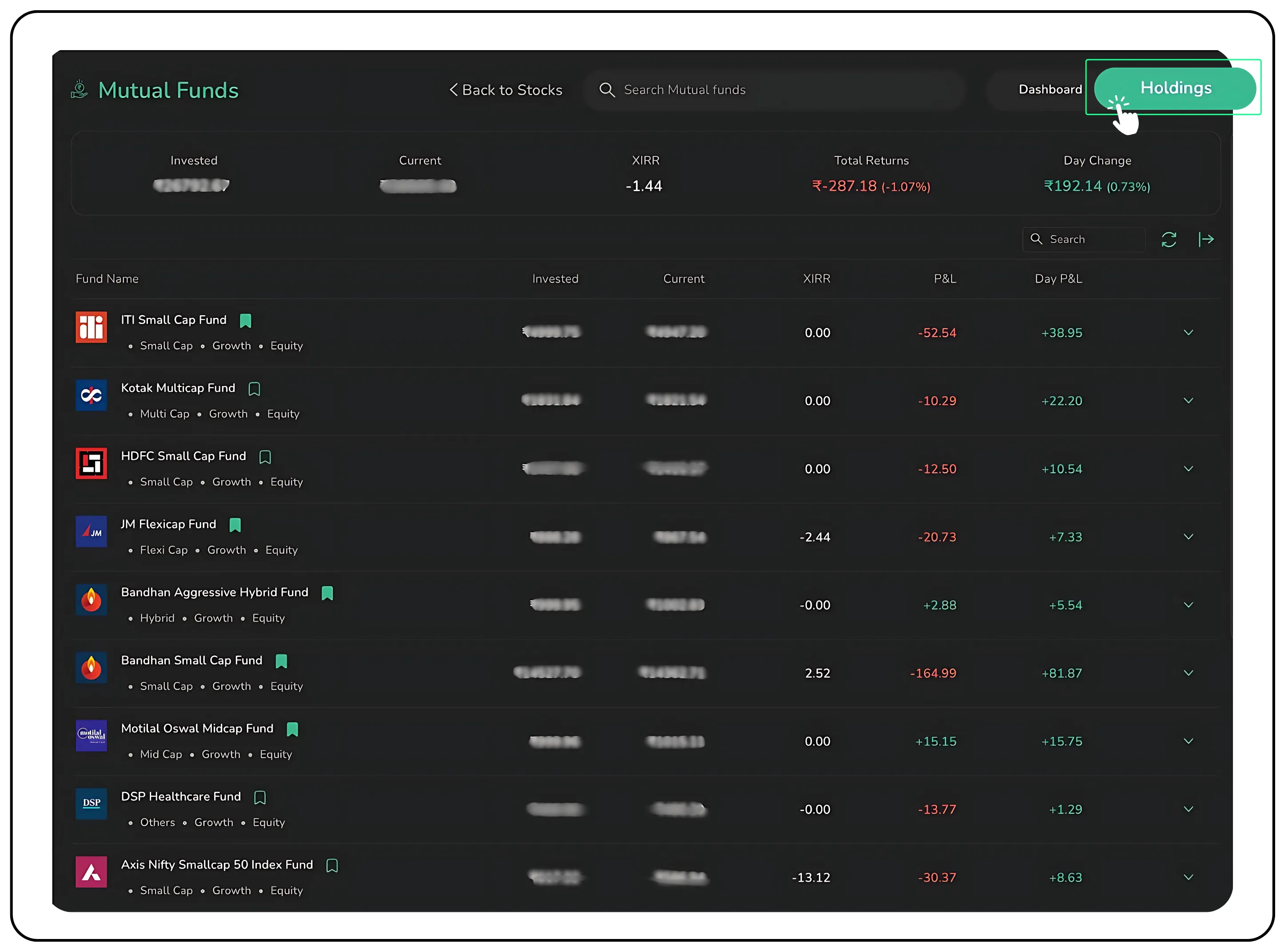
Overview of Orders
Click on the One-Time tab to view a complete summary of your mutual fund orders. This section displays all your transactions; whether they’ve been executed, are pending, or were rejected. Each order is also marked as Buy (B) or Redemption (S) for easy reference.
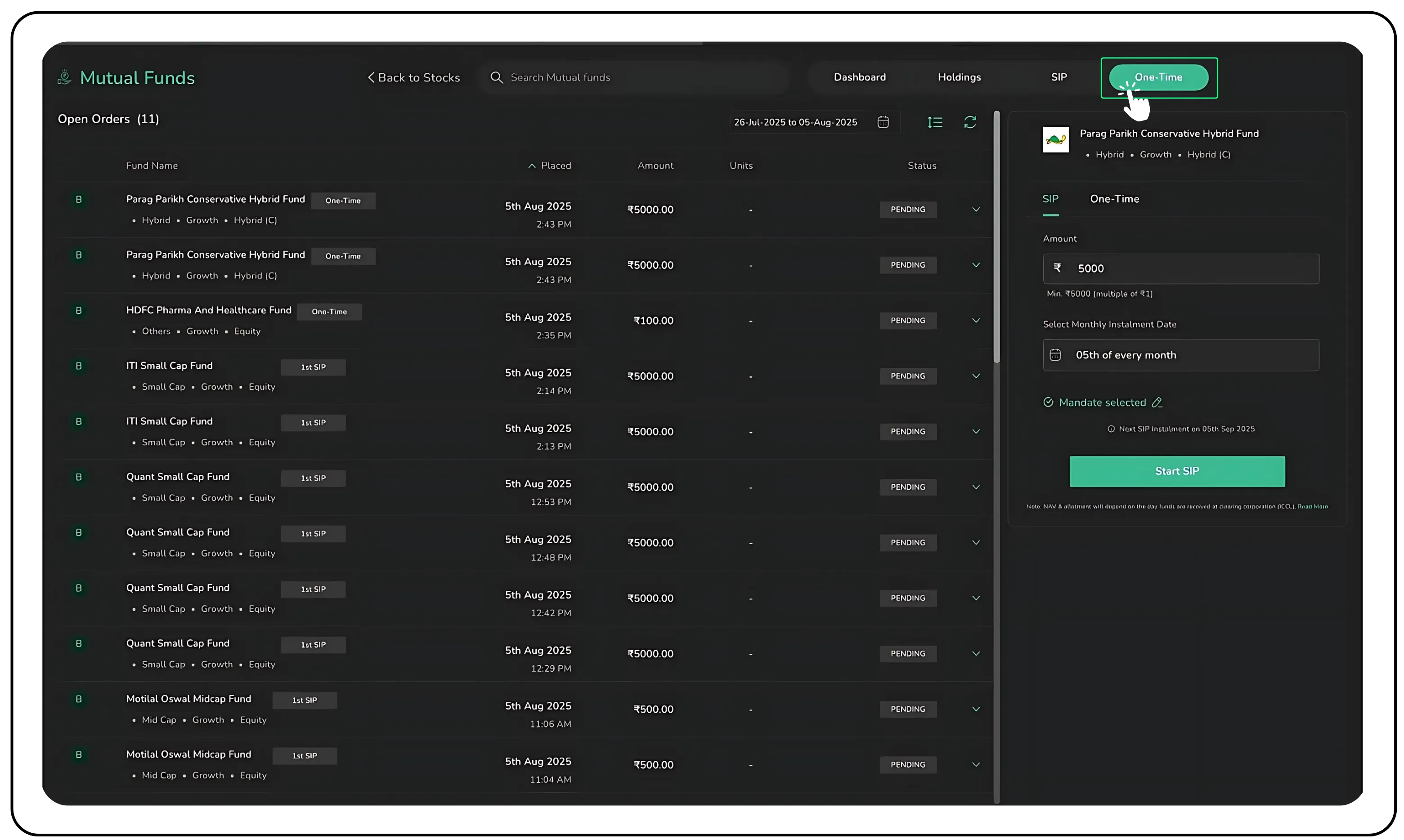
Important Note on Mandate Limit
When you create a mandate on CubePlus, it is automatically capped for an amount of ₹4 lakhs per day as required by regulations. You don’t need to invest the full amount; this just means you can invest up to ₹4 lakhs in a day through SIPs or lumpsum using the same mandate. The limit resets daily, so you can keep investing without creating a new mandate each time.
For example, if you invest ₹2 lakhs today in Parag Parekh Arbitrage Fund and ₹1 lakh in ICICI Prudential Regular Gold Savings Fund, you still have ₹1 lakh available to invest on the same day, under the same mandate.
This single mandate makes your future investments faster, smoother, and doesn’t require you to create more mandates.
Start Your Investing Journey Today
CubePlus makes mutual fund investing easy. whether through SIPs, lumpsum, or by simply tracking funds on your watchlist. With auto-debit mandates, performance tracking, and a user-friendly dashboard, everything you need is in one place.
If you haven’t tried it yet, log in to your CubePlus account and start investing today.
To learn more about investing in Tradejini Mutual Funds, click here.
Disclaimer: The information provided in our blogs is for informational purposes only and should not be construed as financial, investment, or trading advice. Trading and investing in the securities market carries risk. Always conduct your own research and consult with a qualified financial advisor before making any investment decisions. Past performance is not indicative of future results. Copyrighted and original content for your trading and investing needs.
© 2025 — Tradejini. All Rights Reserved.

%252FCubePlus_Shield_Part%25203%2520Blog%2520Thumbnail.webp%3Falt%3Dmedia%26token%3Da5581624-5761-476f-8451-40c157b54840&w=3840&q=75)
%252FShield%2520on%2520Cubeplus%2520part2.webp%3Falt%3Dmedia%26token%3D252a5b48-a580-4e8d-b939-c82d4696eaef&w=3840&q=75)
